sairamg13
Participant
August 1, 2017
Answered

error occurred - An FTP error occurred - Access denied

  • August 1, 2017
  • 2 replies
  • 1883 views

Hio Iam Sai Ram

I am trying to connect dreamwear to my local testing server in my pc ! But i get error "Dynamic related files could not be resolved because your credentials dont allow file activity   on the server"

And Below the log file

Started: 01-Aug-17 12:29 PM

Connected to SRISAI.

goshala.php - error occurred - An FTP error occurred - cannot put goshala.php.  Access denied. 

The file may not exist, or there could be a permission problem. 

Make sure you have proper authorization on the server and the server is properly configured.

File activity incomplete. 1 file(s) or folder(s) were not completed.

Files with errors: 1

goshala.php

Finished: 01-Aug-17 12:29 PM

PLZ HELP ME TO SOLVE THIS ISSUE  ! My ftp details all are correct but still i get this error  Dreamweaver support forumFTP Error. Access denied. The file may not exist (only on root) ??

    This topic has been closed for replies.
    Correct answer Jon Fritz

    OK, this is what I do with XAMPP (Windows version)...

    1. Place your site's local root inside the htdocs folder at C > xampp > htdocs > yoursitefolder
    2. Change Connect Using to "Local/Network

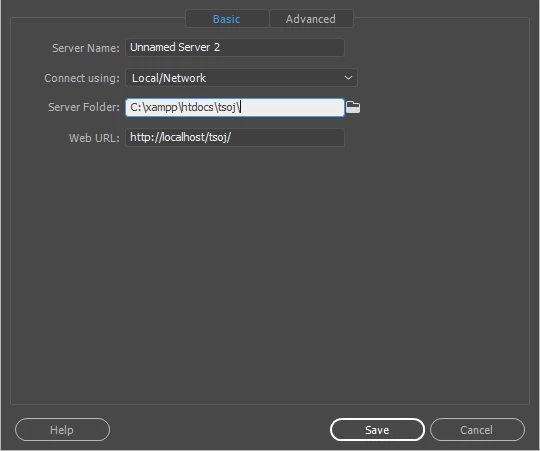
    3. Change "Server Folder" to the folder from step 1. It should look something like C:\xampp\htdocs\yoursitefolder

    4. Change the Web Url line to http ://localhost/yoursitefolder
    5. Save

    Those settings are found under Site > Manage Sites > click your site name > Edit > Servers > click your testing server > Edit > Basic...

    2 replies

    Jon Fritz
    Community Expert
    Community Expert
    August 1, 2017

    Unless your testing server is also a remote server (not your local machine), you won't use FTP settings. In fact, if you put your local root folder within the testing server to start off, you won't ever need to "upload" to the testing server at all.

    Under Site > Manage Sites > click your site > Edit > Servers > click your testing server > Edit change "Connect Using" to "Local /Network" instead of FTP.

    Which server software have you installed? That will determine the best location to store your local site root.

    sairamg13
    sairamg13Author
    Participant
    August 1, 2017

    I Use Xampp Server for local machine !

    Jon Fritz
    Community Expert
    Jon FritzCommunity ExpertCorrect answer
    Community Expert
    August 1, 2017

    OK, this is what I do with XAMPP (Windows version)...

    1. Place your site's local root inside the htdocs folder at C > xampp > htdocs > yoursitefolder
    2. Change Connect Using to "Local/Network

    3. Change "Server Folder" to the folder from step 1. It should look something like C:\xampp\htdocs\yoursitefolder

    4. Change the Web Url line to http ://localhost/yoursitefolder
    5. Save

    Those settings are found under Site > Manage Sites > click your site name > Edit > Servers > click your testing server > Edit > Basic...

    BenPleysier
    Community Expert
    Community Expert
    August 1, 2017

    For a local testing server you do not need FTP. This may help you How to set up a local version of your web site using Dreamweaver

    Wappler is the DMXzone-made Dreamweaver replacement and includes the best of their powerful extensions, as well as much more!
    sairamg13
    sairamg13Author
    Participant
    August 1, 2017

    Okay ! I will go through  it !