Participant
June 21, 2021
Question

Errors when installing updates (CS5)

  • June 21, 2021
  • 2 replies
  • 573 views

At first I thought it was "the usual problem" - occasionally, I would get this message when I tried to update a page:
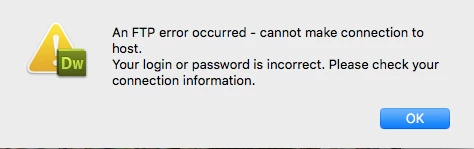
In the past, when I'd try again later, it would work.  Not so this time - I've been trying off and on for the past 24 hours.

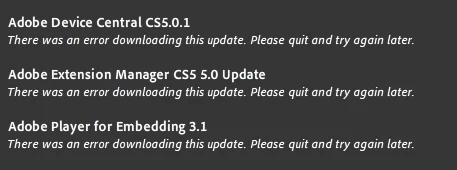
I saw that there were some Adobe updates waiting to be installed, and I've tried (repeatedly) to do that, but I keep getting these error messages:
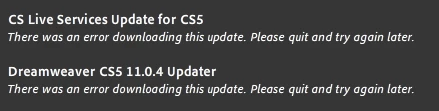
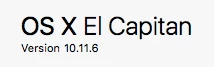
This is all on a Macbook that uses this OS:
 

Any and all help would be appreciated!

This topic has been closed for replies.

2 replies

Nancy OShea
Community Expert
Community Expert
June 21, 2021

I don't think software updates are your problem.  As Jon said, nothing has changed in legacy CS5 in ages.  And most of the updates were for things like Browser Lab service which doesn't exist anymore. 


Try uploading to your remote server with free FileZilla S/FTP client.  It's modern and updated with the latest security patches which CS5 is sorely lacking due to its advanced age. 

https://filezilla-project.org


Failing that, contact your web host.


===============

The web has changed a lot in 11 years.


TUTORIALS:

- https://www.w3schools.com/html/
- https://www.w3schools.com/css/
- https://www.w3schools.com/js/


MODERN CODE EDITORS:
-- Adobe Dreamweaver CC - https://www.adobe.com/products/dreamweaver.html
-- Atom (free) - https://atom.io/
-- Codespaces (free, browser-based) - https://github.com/features/codespaces
-- Nova (Mac only, formerly called Coda) - https://nova.app/
-- Pinegrow - https://pinegrow.com/
-- Sublime Text - http://www.sublimetext.com/
-- Visual Studio Code (free) - https://code.visualstudio.com/


Nancy O'Shea— Product User & Community Expert
Jon Fritz
Community Expert
Community Expert
June 21, 2021

Have you called you hosting company to verify nothing changed on their end?

Certain companies, like GoDaddy, frequently lose FTP log-in credentials when they update the server.

Since DW CS5 hasn't changed since about 2010, it's unlikely that there's something suddenly wrong with the software itself.

Participant
June 21, 2021

Thank you for the response.  After seeing your reply, I sent a screen shot of the error to the hosting company, and they thought they fixed it, but I'm still getting the same error.