


Participant
May 16, 2019
Answered

Expected RBRACE at line 4, col 2. Is this error a bug?

  • May 16, 2019
  • 3 replies
  • 26155 views

/* CSS Document */

:root {

--main-bg-color: white;

--main-text-color: white;

}

I am getting the error:

Expected RBRACE at line 4, col 2.

Expected RBRACE at line 5, col 2.

I am pretty new and did some research on CSS linting but I am still somewhat lost on what to do here.

This topic has been closed for replies.
Correct answer Jon Fritz

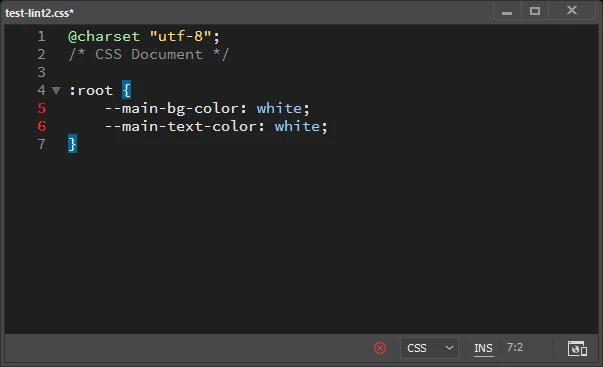
In the latest versions of DW, Linting only fires after the file is saved. As shown here, once the file has been saved, the red line numbers pop up...

@andrewm30596637,

Even the online CSS Linting tools don't quite understand how to work with CSS Variables yet.

There's nothing technically wrong with your code, but If the red line numbers bother you, you can turn off linting under Edit > Preferences > Linting.

3 replies

Inspiring
July 1, 2020

Dear Dreamweaver Team,

as the bug is in CSSLint that doesn't seem to be maintained any longer, would you please move on to another way of linting CSS? Would be great. Because this error gets a bit in the way and css vars get more common nowadays.
See here: https://github.com/CSSLint/csslint/issues/720

B i r n o u
Legend
May 16, 2019

which DW version ? how to you proceed...

I don't get any error here

Jon Fritz
Community Expert
Jon FritzCommunity ExpertCorrect answer
Community Expert
May 16, 2019

In the latest versions of DW, Linting only fires after the file is saved. As shown here, once the file has been saved, the red line numbers pop up...

@andrewm30596637,

Even the online CSS Linting tools don't quite understand how to work with CSS Variables yet.

There's nothing technically wrong with your code, but If the red line numbers bother you, you can turn off linting under Edit > Preferences > Linting.

B i r n o u
Legend
May 16, 2019

good catch Jon,