Known Participant
May 26, 2025
Answered

Exporting a clean website?

  • May 26, 2025
  • 3 replies
  • 846 views

Hi,
I have a local website which got pretty cluttered over the years, duplicate pages, unused images. I will keep a copy of it for resources, but wish I could work from a clean website while retaining all the elements present in the libraries.

There is a great feature in InDesign which allows to export a clean document without orphan files. Is there something similar in Dreamweaver? Or would that work by importing the website ?

Thanking you for any hint on how to proceed !

Kind regards, Paul

    Correct answer Nancy OShea

    There is no magic button that cures hoarding.  Ultimately, you must decide which files to keep or delete manually.


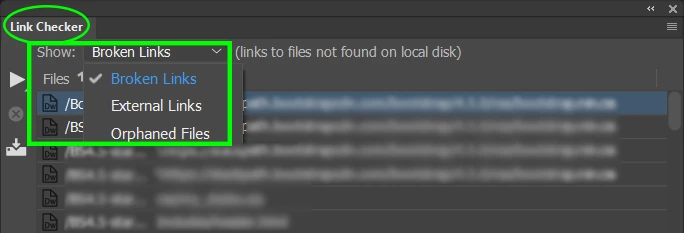
    That said, Dreamweaver has a built-in Link Checker to help you make those decisions.

    Go to Site ⇒ Site Options ⇒ Check Links Sitewide to generate reports of Broken Links and/or Orphaned Files.

    View or "Save Report" for future reference.


    Happy housecleaning!


    3 replies

    Participant
    July 12, 2025

    Hey everyone! I have a quick technical question regarding my site QiratulQuran.com, which offers online Quran learning services. What are some of the best ways to improve page speed and Core Web Vitals for a content-heavy educational site that includes audio and video resources? Also, would implementing a CDN like Cloudflare significantly help with performance for global users? Any insights or suggestions would be much appreciated!


    Participant
    November 10, 2025

    Hi,
    I had a similar issue on one of my websites with a lot of media files. A few things helped me:

    Compressing images before uploading

    Using WebP format

    Reducing heavy animations

    Lazy loading for large images and videos

    Removing unnecessary plugins or scripts


    After these changes, the site speed improved and loaded better for visitors.
    Maybe try a few of these steps — they are easy and helpful.

    Participant
    November 21, 2025

    I am also facing the same issue on my taxi company website. I also hired a developer for this work, but he couldn't even solve it. If anybody has a solution for it. Please let mw know. I want to solve this problem. My website is Royal Eastern Taxi.

    Participant
    June 23, 2025

    Hey Paul,

    I totally get where you’re coming from — I’ve been in the same boat! Over time, my local site got really messy too, with tons of unused media, duplicate content, and outdated files. I love that InDesign has that export-clean feature — super handy! I’ve been searching for something similar in Dreamweaver as well, but haven’t found a built-in way to export a “clean” version yet. What I’ve started doing is manually auditing the site and rebuilding from a fresh template while keeping essential assets backed up separately. Not ideal, but it gives a much lighter and more manageable setup. Would be great if Dreamweaver had a smart cleanup/export tool too. Hope someone here has a pro tip to share!

    alpshikerAuthor
    Known Participant
    June 23, 2025

    Hey Bilal,
    Thanks for your support, I'm feeling less alone!
    It certainly is a good move to start from a fresh template. I am told that my PHP is almost outdated for what it means, so it would probably not be a total waste of time for me to do that as well. But I wish you are younger than me, for clutter is in my head too with information rolling up like a snowball since the days of PageMill through Golive and now Dreamweaver, and perhaps a timely move to another program… Cleaning is a great thing once it's done, but there are so many distractions along the way and there is always something more interesting to do or more urgent...
    Good luck on your side!

    Nancy OShea
    Community Expert
    Nancy OSheaCommunity ExpertCorrect answer
    Community Expert
    May 26, 2025

    There is no magic button that cures hoarding.  Ultimately, you must decide which files to keep or delete manually.


    That said, Dreamweaver has a built-in Link Checker to help you make those decisions.

    Go to Site ⇒ Site Options ⇒ Check Links Sitewide to generate reports of Broken Links and/or Orphaned Files.

    View or "Save Report" for future reference.


    Happy housecleaning!


    Nancy O'Shea— Product User & Community Expert
    alpshikerAuthor
    Known Participant
    May 26, 2025

    Yes I am an incorrigible collector. I still had in mind some arborescence tool that did help point out orphan pages in Golive, or maybe it was in the preceeding program who's name I can't even remember. Or I just dreamed of it. In any case, thank you for your kind explanation! I will tackle the job with the hand broom.


    Could you just let me know if it is a bad idea to replace the local site by the distant site? Would I lose some valuable data and items?

    Nancy OShea
    Community Expert
    Community Expert
    May 26, 2025

    I can't answer that with any authority.  I will say that my local & remote site folders are similar, but NOT identical.


    Certain essential server files should not be kept locally.  Conversely, some local files should not be kept on the public server.


    You can expand your Files Panel for a side-by-side comparison of your Remote & Local Files.


    Nancy O'Shea— Product User & Community Expert