Budson54
Participant
July 18, 2017
Answered

External links go to live view page

  • July 18, 2017
  • 1 reply
  • 184 views

I am having a problem with Dreamweaver (new user) that I can't seem to solve.

Having problem that in the pages I am building if I put in an external link to http://www.google.com and select it to view in an external browser the URL that shows in the browser is    "http://127.0.0.1:60882/preview/app/index.html"    which is the URL that the live device preview link sent to my iPhone, something else that not is working.

Any suggestion on how to proceed is welcomed....

    This topic has been closed for replies.
    Correct answer Nancy OShea

    Actually, that's exactly how Real-Time Preview works.

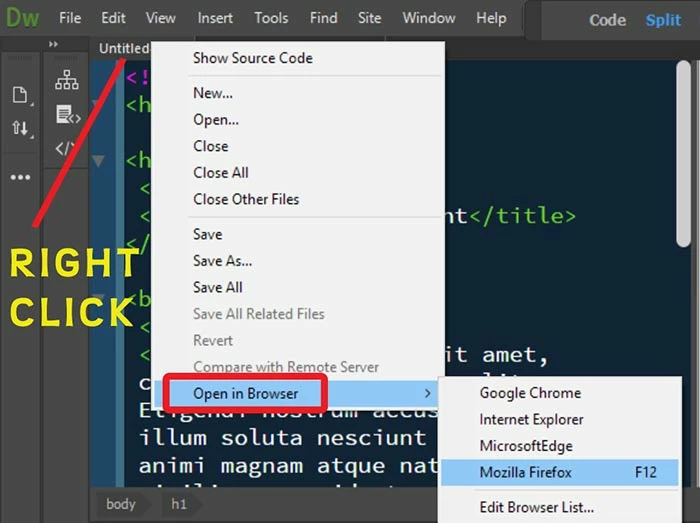
    If you want to test external links locally, right click on your document tab or a file in your Files Panel and select Open in Browser. See screenshot.  NOTE:  Don't use F12.

    1 reply

    Nancy OShea
    Community Expert
    Nancy OSheaCommunity ExpertCorrect answer
    Community Expert
    July 18, 2017

    Actually, that's exactly how Real-Time Preview works.

    If you want to test external links locally, right click on your document tab or a file in your Files Panel and select Open in Browser. See screenshot.  NOTE:  Don't use F12.

    Nancy O'Shea— Product User & Community Expert