


Participant
October 23, 2017
Question

Extract panel doesn't load .psd

  • October 23, 2017
  • 1 reply
  • 611 views

Hi,

When I open the extract panel, I choose a PSD already on my cloud to open. It shows that it is loading, but keeps loading indefinitely, with only the transparent background showing, and the four loading squares rotating. When I open the styles tab, it is blank, although the layers tab does show me my assets. When selecting an element in the layers tab, it shows me a blue outline on my transparent grid. Even when opening either of the two tabs (styles/layers), the blue and grey loading squares keep rotating. Am I doing something wrong, or is it a bug that snuck in with the new release (first time I'm using the latest version).
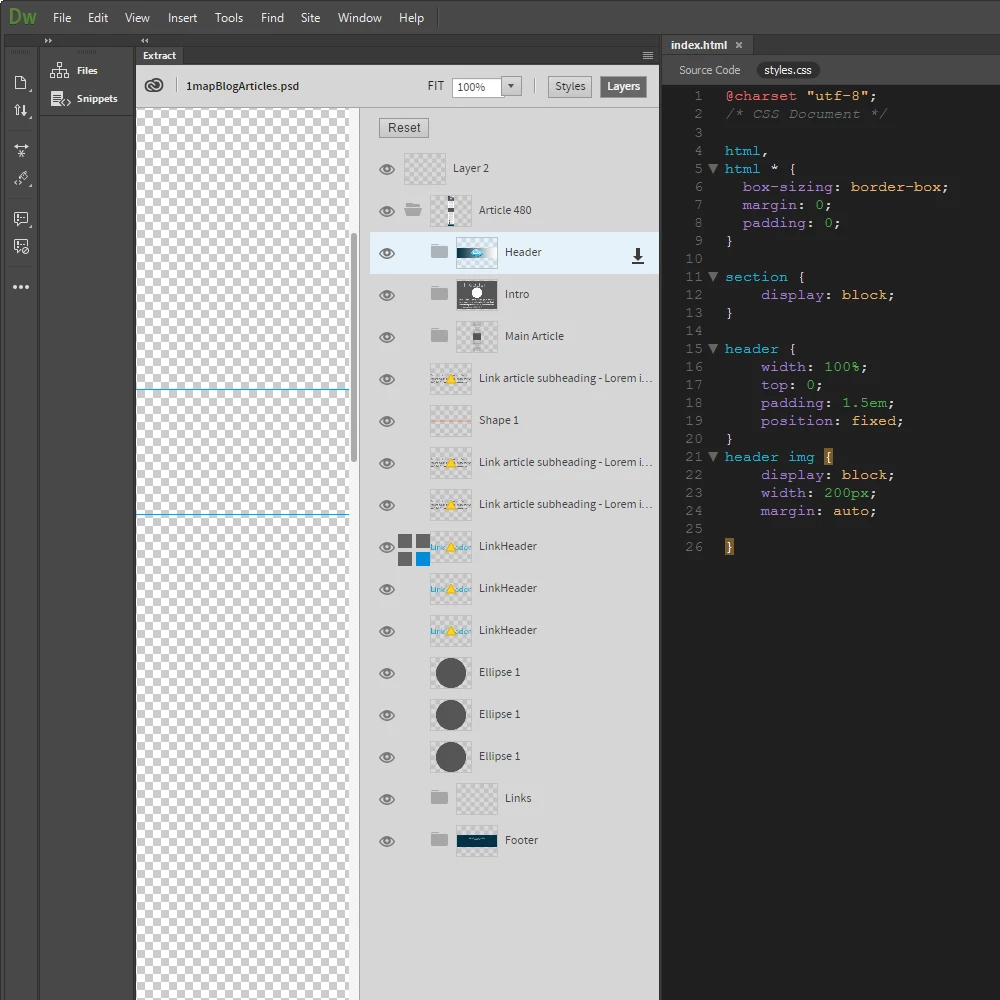
    This topic has been closed for replies.

    1 reply

    Community Manager
    October 24, 2017

    Hi Nick,

    Sorry for the trouble you facing with DW Extract.

    1. Do you see this issue consistently i.e. every time you load psd?

    2. Is it happening with all of your psd files or some specific one?

    3. Can you try the problematic psd in web Extract Adobe Creative Cloud , if same psd works fine there?

    NicK_RSAAuthor
    Participant
    October 24, 2017

    Hi Inayal,

    Thanks for getting back to me.

    1. I’ve only tried using it once before, last week, and the extract panel loaded the psd.

    2. Yesterday it didn’t work with either of two psd’s that I tried. This morning it appears to work with the one, but not with the other one. The one that opens, however, has a simple linear gradient, but when I select the block with the gradient, it doesn’t pick up the gradient. Not sure whether it is a related issue.

    3. I am not sure what you mean by the suggestion? I am using the latest DW CC, and the file was selected from my creative cloud (was already saved there), and I have also tried re-uploading the psd, and it still didn’t open. Is there a cloud-based extract feature?

    Kind regards,

    Nicolaas

    Community Manager
    October 25, 2017

    Hi Nicolaas,

    Yes, there is a cloud based extract feature. if you go to that link, your psd will already be listing there. Just click on that and Web extract feature will be available.

    Do let us know if cloud Extract works and DW doesn't.

    Thanks.