Known Participant
July 26, 2020
Answered

F12 preview show me the page but through an iFrame and not the original file

  • July 26, 2020
  • 1 reply
  • 641 views

F12 preview show me the page but through an iFrame and not the original file,

It happened lately and I don't know why instead of loading my local file from my computer it somehow renders it through iframe so when I came to edit it via Dev-Tools I can't really do anything


see image below 

 

This topic has been closed for replies.
Correct answer Nancy OShea

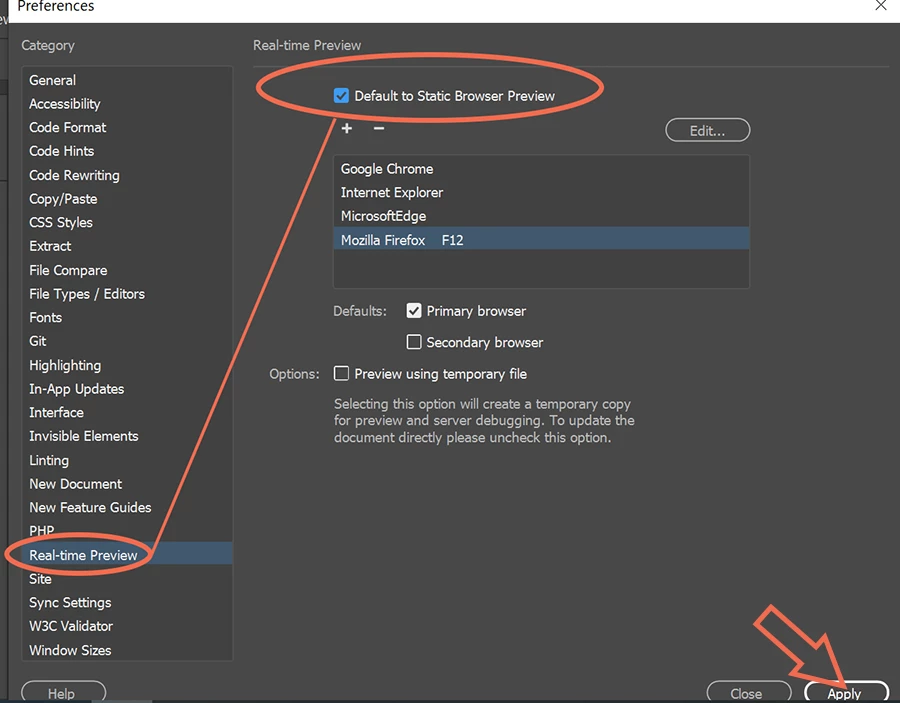
Yes, Real-Time / Device Preview uses an iframe.  To disable RTP, go to Preferences and select Default to Static Browser Preview.  See screenshot.


1 reply

Nancy OShea
Community Expert
Nancy OSheaCommunity ExpertCorrect answer
Community Expert
July 26, 2020

Yes, Real-Time / Device Preview uses an iframe.  To disable RTP, go to Preferences and select Default to Static Browser Preview.  See screenshot.


Nancy O'Shea— Product User & Community Expert
Known Participant
July 29, 2020

Thank you  Nancy OShea

Can you explain to me what is the purpose of the RTP

and what are the benefits of RTP over Default to Static Browser Preview

Jon Fritz
Community Expert
Community Expert
July 29, 2020

Real Time Preview is supposed to update the page in the browser as you work in DW, without needing to save your work.

It never worked correctly for a good number of people so Adobe added the option to default to a static preview to the Preferences a few releases back.