
Inspiring
January 30, 2019
Answered

File management on web host

  • January 30, 2019
  • 1 reply
  • 432 views

I finally got to log in with my chosen host.  Now, I'm trying to create a subfolder within my public_html folder to put my provisional web design (and hopefully others). I managed to "Put" my files up, I could delete unwanted junk, and move them into already existing folders, but not create a new one?  Is there a command I'm missing?

Thank you all. 
    This topic has been closed for replies.
    Correct answer Paul-M

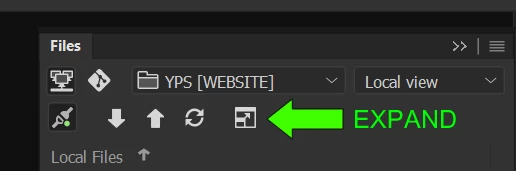
    Expand your file panel so you can see local and remote sites. Right click in the local or remote panel area and you have an option new folder in the context menu:

    1 reply

    Paul-MCorrect answer
    Legend
    January 30, 2019

    Expand your file panel so you can see local and remote sites. Right click in the local or remote panel area and you have an option new folder in the context menu:

    Paul-M - Community Expert
    anastasi5Author
    Inspiring
    January 30, 2019

    Eureka!

    I was going back and forth in the Publishing section of the User guide and couldn't find this simple solution.

    Thanks!

    Legend
    January 30, 2019

    you are welcome

    Paul-M - Community Expert