Participating Frequently
March 28, 2022
Answered

Files not transferring to server

  • March 28, 2022
  • 2 replies
  • 405 views

I am using DW21.1 on a Mac running OS12.2.1 (Monterrey). Hosting is by Namecheap.

DW tells me I am connecting successfully to the remote server, but when I try to upload a file the background file information window tells me "--same--not tranferred"

I saw on a Namecheap help forum that they use Linux servers, so I wonder if that has anything to do with it.

My tech level is pretty minimal. Any suggestions?
    This topic has been closed for replies.
    Correct answer Nancy OShea

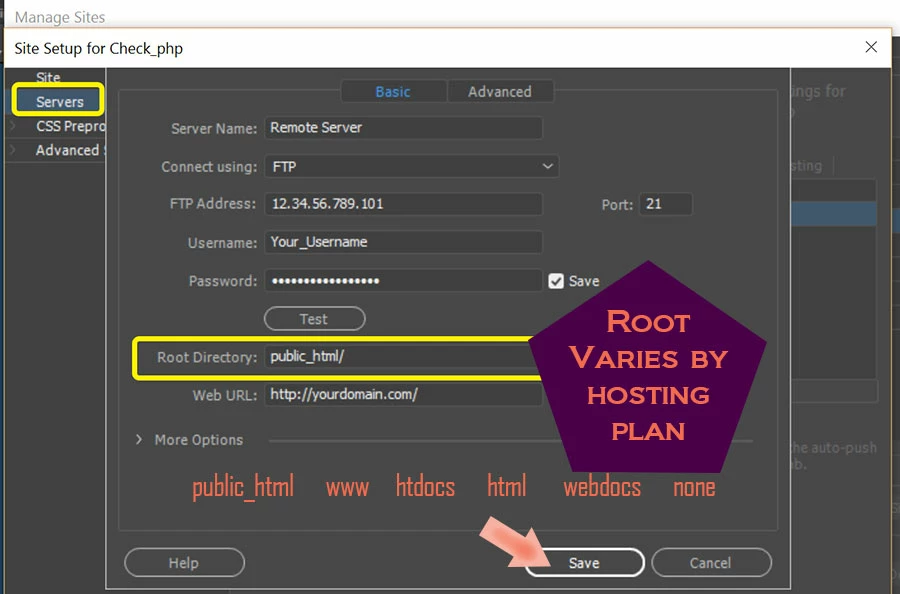
    The key thing to check is that you're uploading files to the correct ROOT directory on your server.  Many Linux hosting plans use public_html/ but if you're unsure, check with Namecheap.


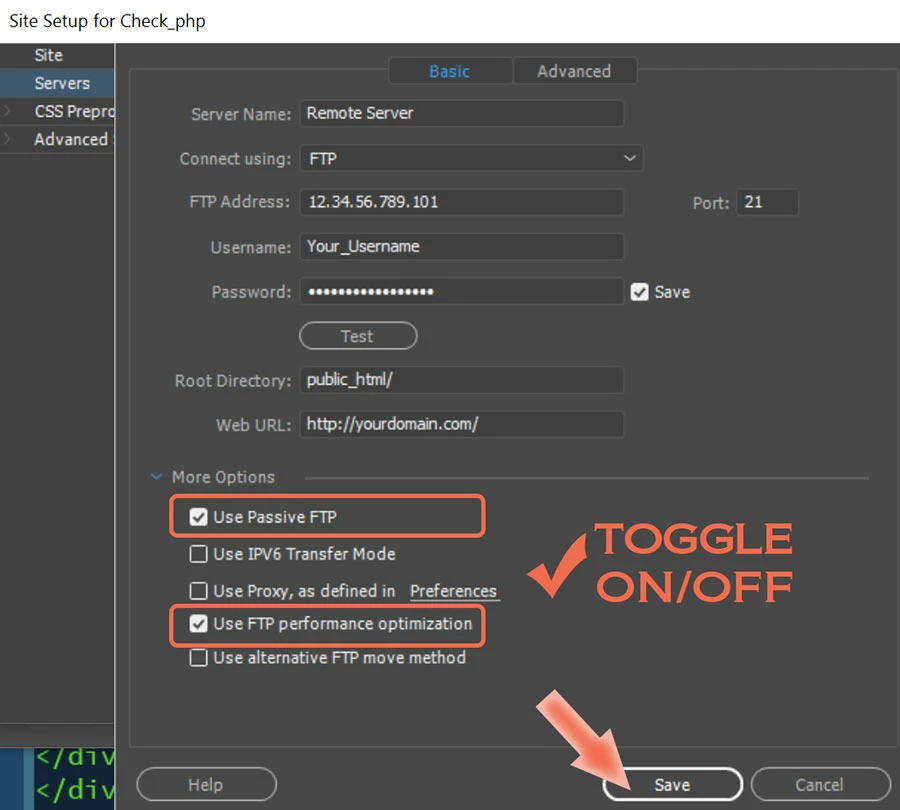
    In DW, go to Site > Manage Sites > click on your site definition.   Click the Servers tab.  Verify your FTP log-in credentials are entered as Namecheap says to.  See example screenshot.


    Click on More Options.


    Click the TEST button.


    If that works, try uploading a single file from your Files Panel (F8) such as index.html.


    Post back with your results.


    2 replies

    Participating Frequently
    March 29, 2022

    Bless you! Substituting public_html/ for what I believe Namecheap instructed me to use, allowed me to upload a trial fuile, which actually showed up on the Internet!

    Now to do more extensive revisions!

    Thanks again.

    Nancy OShea
    Community Expert
    Community Expert
    March 29, 2022

    You're welcome.  Glad I could help. 🙂


    Nancy O'Shea— Product User & Community Expert
    Nancy OShea
    Community Expert
    Nancy OSheaCommunity ExpertCorrect answer
    Community Expert
    March 28, 2022

    The key thing to check is that you're uploading files to the correct ROOT directory on your server.  Many Linux hosting plans use public_html/ but if you're unsure, check with Namecheap.


    In DW, go to Site > Manage Sites > click on your site definition.   Click the Servers tab.  Verify your FTP log-in credentials are entered as Namecheap says to.  See example screenshot.


    Click on More Options.


    Click the TEST button.


    If that works, try uploading a single file from your Files Panel (F8) such as index.html.


    Post back with your results.


    Nancy O'Shea— Product User & Community Expert