codysnodgrass
Participant
November 3, 2016
Answered

Files Tab - Sites Drop-down not working (Mac)

  • November 3, 2016
  • 2 replies
  • 651 views

I updated to Mac OS Sierra and with Dreamweaver CC 2015.5 & Dreamweaver CC 2017 my drop-down under the Files tab on the Standard workspace layout (right-hand side) doesn't work. It should show all sites like it did before I updated to Sierra. I thought maybe DW CC 2017 would fix the issue but I'm having the same problem. I can still get to the sites via Site > Manage Sites
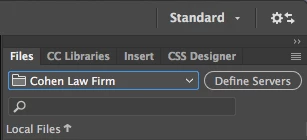
UPDATE:

I just went into my Preferences and noticed that any of those drop-downs don't work either. It seems as though any sort of drop-down menu in the interface doesn't work.

Message was edited by: Cody Snodgrass

This topic has been closed for replies.
Correct answer codysnodgrass

Adobe Support tech helped figure out the issue, which was related to having two additional monitors that aren't retina displays connected to my 5K iMac. The solution was to unplug both monitors and then reconnect them and test DW on each monitor. After doing that for both additional displays DW's drop-downs now work properly!

Thanks for all the help!

2 replies

codysnodgrass
codysnodgrassAuthorCorrect answer
Participant
November 4, 2016

Adobe Support tech helped figure out the issue, which was related to having two additional monitors that aren't retina displays connected to my 5K iMac. The solution was to unplug both monitors and then reconnect them and test DW on each monitor. After doing that for both additional displays DW's drop-downs now work properly!

Thanks for all the help!

Preran
Legend
November 3, 2016

Hi csnodgr,

Please send me your Adobe ID, location, and phone number over a private message. Click my picture and use the Message button. We will get in touch with you for investigation.

Thanks,

Preran

codysnodgrass
Participant
November 3, 2016

Thanks Preran.

I sent you a private message with the details you asked for.

Preran
Legend
November 4, 2016

My team member tried reaching out to you but was unable to. Can you check your inbox to see if you have an email from us?