


Known Participant
November 10, 2016
Answered

Find and Replace doesn't work properly.

  • November 10, 2016
  • 1 reply
  • 1917 views

In Dreamweaver 2017, Find and Replace doesn't work properly.

It only finds words using the Current Document or Open Document search.

It won't find words in the Current Site search mode. When I type a word that occurs in some of the closed pages, and then press the "Find All" button, the beachball appears briefly, and no pages are opened.

I recreated the site cache and restarted Dreamweaver, but that search still doesn't work.
    This topic has been closed for replies.
    Correct answer

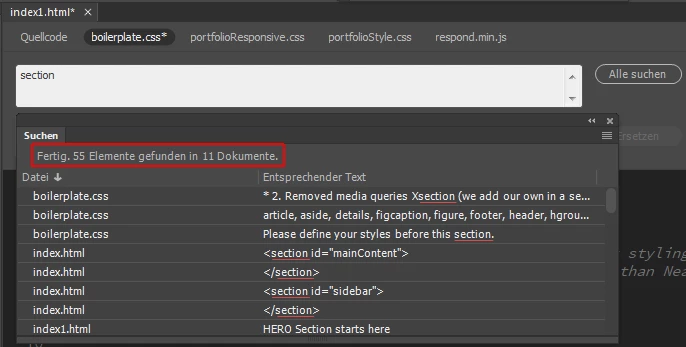
    It doesn't open all the files, but it shows the search result in the panel "Search".

    With a doubleclick on the search term you can open the file.

    Fenja

    1 reply

    Correct answer
    November 10, 2016

    It doesn't open all the files, but it shows the search result in the panel "Search".

    With a doubleclick on the search term you can open the file.

    Fenja

    Known Participant
    November 11, 2016

    Thanks, Fenja.

    I'm using the Find > Find and Replace function – not "Search"

    If I instead go Help > Search, my computer shows a floating arrow that shows where in Dreamweaver to navigate to to locate "Find and Replace" in the top menus.  So going to Help > Search doesn't solve my problem.

    When I double click on the search term that I've typed in the "Find and Replace" rectangle, the search word or phrase becomes highlighted in blue, but nothing else happens.

    So I'm still confused.

    Tony

    November 12, 2016

    Sorry, it's a translation problem. I'm using the german version of Dreamweaver.

    Second try:

    Open the "Find and replace" window.

    Put in your search term and in the "Find in" dropdown choose "Current site".

    Click on "Find all".

    Now a new panel should open, its name is "Search". If not, you'll find this panel in Window > Results > Search.

    There is a list of all the found terms all over the site, in open or closed files.

    If this fails you should reset Dreamweaver, before taking the hardship of reinstalling.

    Hope it helps.

    Fenja