augustot26893154
Inspiring
September 14, 2017
Answered

Find any orphan pages - Dreamweaver CC 2017

  • September 14, 2017
  • 2 replies
  • 1334 views

Buona sera,

vorrei sapere se con Dreamweaver CC 2017 è possibile controllare l'intero sito web e trovare eventuali pagine orfane.

Grazie

Augusto

----------

Good evening,
I would like to know if Dreamweaver CC 2017 can control the entire website and find any orphan pages.

Thank you

Augusto

This topic has been closed for replies.
Correct answer Nancy OShea

Window > Results > Link Checker.

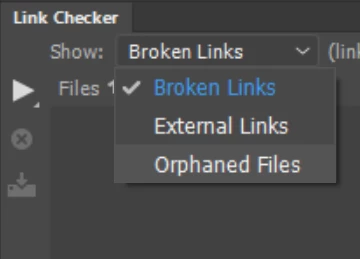
After Dreamweaver checks for Broken Links in your Local Site folder, you can check for Orphaned Files and optionally Save your report.

2 replies

Nancy OShea
Community Expert
Nancy OSheaCommunity ExpertCorrect answer
Community Expert
September 14, 2017

Window > Results > Link Checker.

After Dreamweaver checks for Broken Links in your Local Site folder, you can check for Orphaned Files and optionally Save your report.

Nancy O'Shea— Product User & Community Expert
augustot26893154
Inspiring
September 14, 2017

Thank you.

August

Participant
January 20, 2023

Unfortunately, this feature appears to be broken in version 21.3

Jon Fritz
Community Expert
Community Expert
September 14, 2017

You can find orphan files of a defined site by doing the following...

1. Select your site from the dropdown menu in the Files window

2. Go to Site > Site Options > Check Links Sitewide (or hit Ctrl + F8)

3. In the Dialogue window that appears, select Orphaned Files in the "Show" dropdown menu

That will give you a list of all files in your site that have no incoming links.