Participant
October 19, 2020
Answered

Find returning different results than advanced Find and Replace

  • October 19, 2020
  • 2 replies
  • 347 views

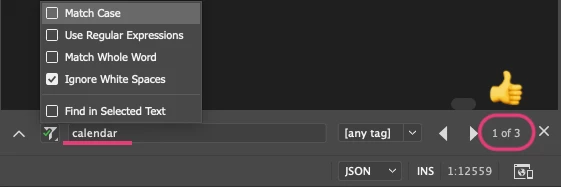
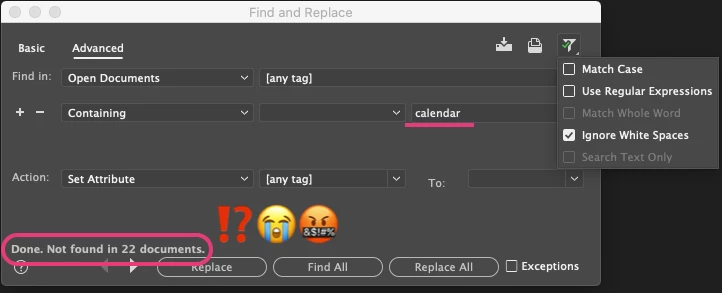
Please help! I'm trying to locate instances of specific strings in all open documents. When I use Find, I'm able to locate three examples in a document, but when I use Advanced Find and Replace (with the same text string and filters) it's returing ZERO results in all 22 documents (including the one that just found 3 matches using regular Find.)
 

This topic has been closed for replies.
Correct answer Nancy OShea

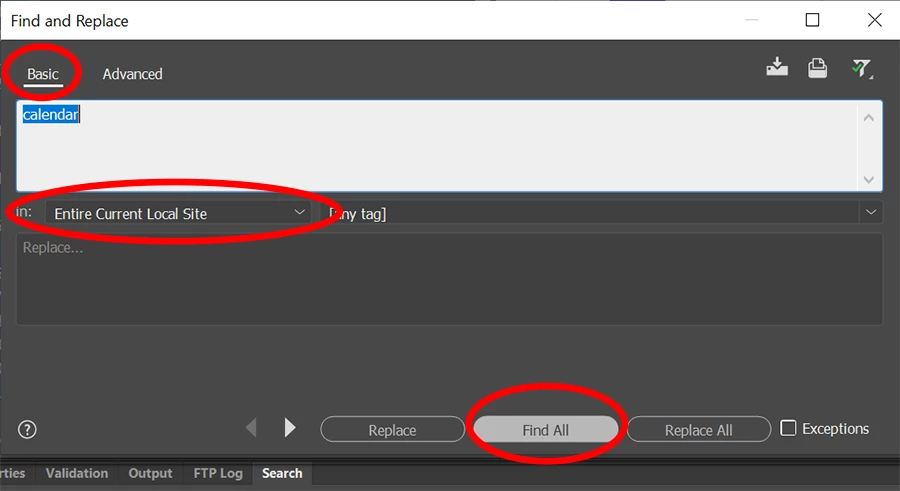
You don't need Advanced search for this. A Basic search should suffice.  Ctrl+Shift+F.  See screenshot. Just make sure all your files reside in the local site folder on your primary hard drive.


2 replies

Nancy OShea
Community Expert
Nancy OSheaCommunity ExpertCorrect answer
Community Expert
October 19, 2020

You don't need Advanced search for this. A Basic search should suffice.  Ctrl+Shift+F.  See screenshot. Just make sure all your files reside in the local site folder on your primary hard drive.


Nancy O'Shea— Product User & Community Expert
Participant
October 20, 2020

Great, thanks Nancy! (That still doesn't expain why they're not showing up when the advanced tab is active, but it does solve my issue!)


Your time and assistance is greatly appreciated.

Jon Fritz
Community Expert
Community Expert
October 19, 2020

I am not seeing the same issue here, in DW 20.2 Build 15263 under, Windows 10.

Have you tried restoring preferences yet?

That clears out all kinds of weirdness that makes its way into the program and might fix this for you...

https://helpx.adobe.com/dreamweaver/kb/restore-preferences-dreamweaver.html