


Participant
April 28, 2023
Answered

Finding a css design in website

  • April 28, 2023
  • 2 replies
  • 895 views

Hi can anyone help me I have a website https://www.philipashleycarpentry.co.uk/ I am trying to find where the css style is when you change to a small screen view  the nav bar changes to a light brown color i need the file and it is in and the line please.


Thanks any help would be appreciated
    This topic has been closed for replies.
    Correct answer osgood_

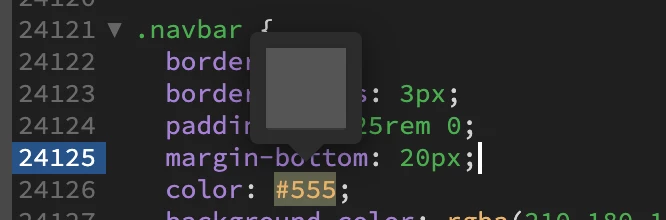
    hi sorry its not that its the light brown background color i am trying to change that css style is not the color i want to change please see picture


    @perchfishtrout wrote:

    hi sorry its not that its the light brown background color i am trying to change that css style is not the color i want to change please see picture


    As Ben stated background-color is what you need - line 24127.


    You don't need to use rgba if you don't understand what rgba is, you can just use:


    background-color: #123456; if that is easier for you.


    2 replies

    Nancy OShea
    Community Expert
    Community Expert
    April 28, 2023

    Assuming you didn't create this template (if you did, you wouldn't be asking this question), whoever did build this is the person you should contact.


    You have plenty of freedom to make content changes within child pages. You should not be tampering with the main Template without coding literacy & thorough understanding of how DW Templates work.


    Most responsive sites are built mobile-first.  In other words, the mobile styles are the defaults upon which all other styles are created. Making random style changes without understanding how all the pieces fit together could result in  unwanted surprises.  Whenever possible, always defer to the Template's creator before making sitewide changes.


    Nancy O'Shea— Product User & Community Expert
    Participant
    April 29, 2023

    Really is that the best answer i think you should keep you comments to your self no help at all

    Nancy OShea
    Community Expert
    Community Expert
    April 29, 2023

    You're welcome. 🙂


    Nancy O'Shea— Product User & Community Expert
    BenPleysier
    Community Expert
    Community Expert
    April 28, 2023

    Right-click on the page and in the pop-up menu choose `Inspect`

    In the Developer panel, click on `Select Element ....` and choose the navigation bar. On the right you will see the CSS, the source file and line numbers.


    Wappler is the DMXzone-made Dreamweaver replacement and includes the best of their powerful extensions, as well as much more!
    Legend
    April 28, 2023

    bass.css.......line 24121 of 30018 phewy.....!

    Participant
    April 28, 2023

    thank you so much i did try that but i am using a mac so it seems not to show up like you pictures


    Thanks philip