


August 4, 2017
Answered

Flex and vh understood by CS4?

Good afternoon!

Maybe this is one of those (non-existent) dumb questions...  (I haven't done anything with web pages for ... 5-6 years.)

The following code is from:   https://www.quackit.com/css/flexbox/tutorial/create_a_website_layout_with_flexbox.cfm

<!doctype html>

<title>Example</title>

<style>

  * {

   box-sizing: border-box;

  }

  body {

    margin: 0;

  }

  #main {

    display: flex;

    min-height: calc(100vh - 40vh);

  }

  #main > article {

    flex: 1;

  }

  #main > nav,

  #main > aside {

    flex: 0 0 20vw;

    background: beige;

  }

  #main > nav {

    order: -1;

  }

  header, footer, article, nav, aside {

    padding: 1em;

  }

  header, footer {

    background: yellowgreen;

    height: 20vh;

  }

</style>

<body>

  <header>Header</header>

  <div id="main">

    <article>Article</article>

    <nav>Nav</nav>

    <aside>Aside</aside>

  </div>

  <footer>Footer</footer>

</body>

This is my result:
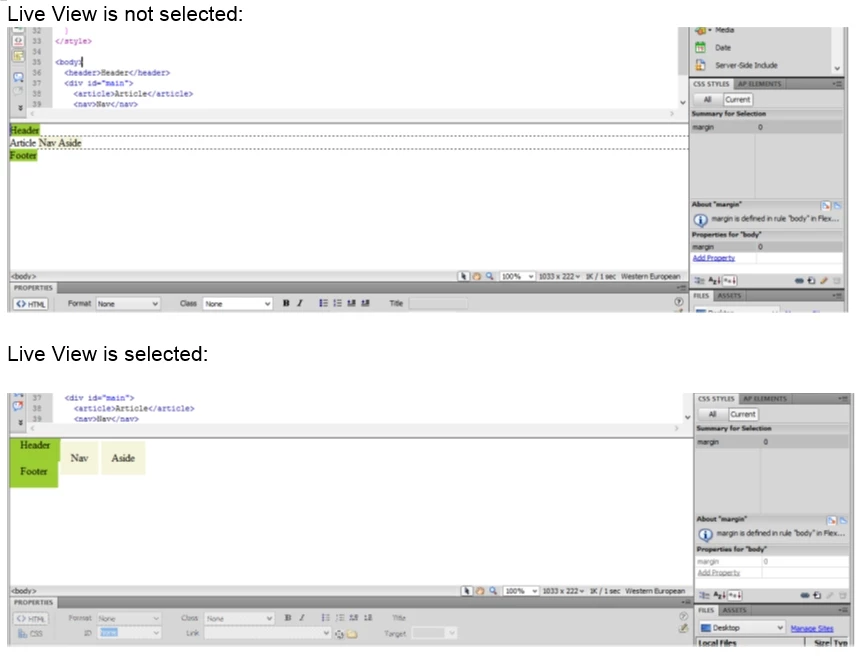
My results look nothing like the "holy grail" example on the above link.

If "Flex" and "vh" (or box-sizing) are acceptable to CS4 Dreamweaver, then there must be something I need to change in my configuration.

HELP!!

Any suggestions are appreciated.  Thank you!!

This topic is closed to new replies. Start a new post to keep the conversation going.
BenPleysier
BenPleysierCorrect answer
Community Expert
August 5, 2017

Where is the closing NAV tag?

Also the DOCTYPE could be updated to <!DOCTYPE html> - the correct HTML5 notation.

Wappler is the DMXzone-made Dreamweaver replacement and includes the best of their powerful extensions, as well as much more!

5 replies

Nancy OShea
Community Expert
Community Expert
August 4, 2017

Forget about viewport units and flexbox in CS4.  You won't have a prayer of seeing anything close. 

If you want to build responsively, switch to Code View and stay there.

Translate
Nancy O'Shea— Product User & Community Expert
August 5, 2017

Why won't Dreamweaver render it correctly?

This is what Chrome shows me.  It's not working either.  What am I missing?

<!DOCTYPE html PUBLIC "-//W3C//DTD XHTML 1.0 Transitional//EN" "http://www.w3.org/TR/xhtml1/DTD/xhtml1-transitional.dtd">

<head>

    <title>All Star Heating & Air</title>

</head>

<style>

  * {

   box-sizing: border-box;

  }

  body {

    margin: 0;

  }

  #main {

    display: flex;

    min-height: calc(100vh - 40vh);

  }

  #main > article {

    flex: 1;

  }

  #main > nav,

  #main > aside {

    flex: 0 0 20vw;

    background: beige;

  }

  #main > nav {

    order: -1;

  }

  header, footer, article, nav, aside {

    padding: 1em;

  }

  header {

    background: white;

    height: 20vh;

  }

  footer {

    background: yellowgreen;

    height: 20vh;

  }

</style>

<body style="background-color: #97959F">

  <header><img src="images/all_star_logo_long3.jpg" alt="LongLogo"></header>

<div id="main">

        <nav>Servicing:

</br></br>

- Carlsbad</br>

- Cardiff</br>

- Del Mar</br>

- Escondido</br>

- Oceanside</br>

- Poway</br>

- San Marcos</br>

- Valley Center</br>

- Vista</br>

& San Diego County</br>

    <article>Article</article>

</br></br>

       <aside>

        Services:

</br></br>

- Repairs all Makes & Models</br>

- Residential & Commercial</br>

- Energy Efficient Upgrades</br>

- Indoor Air Quality Options</br>

- Energy Saving Services</br>

- Free In-Home Estimates</br></aside>

  </div>

    <footer>Footer</footer>

</body>

Really do appreciate your help!!

Translate
BenPleysier
Community Expert
BenPleysierCommunity ExpertCorrect answer
Community Expert
August 5, 2017

Where is the closing NAV tag?

Also the DOCTYPE could be updated to <!DOCTYPE html> - the correct HTML5 notation.

Translate
Wappler is the DMXzone-made Dreamweaver replacement and includes the best of their powerful extensions, as well as much more!