
nilleg57851248
Inspiring
January 3, 2020
Question

Float problems

  • January 3, 2020
  • 3 replies
  • 706 views

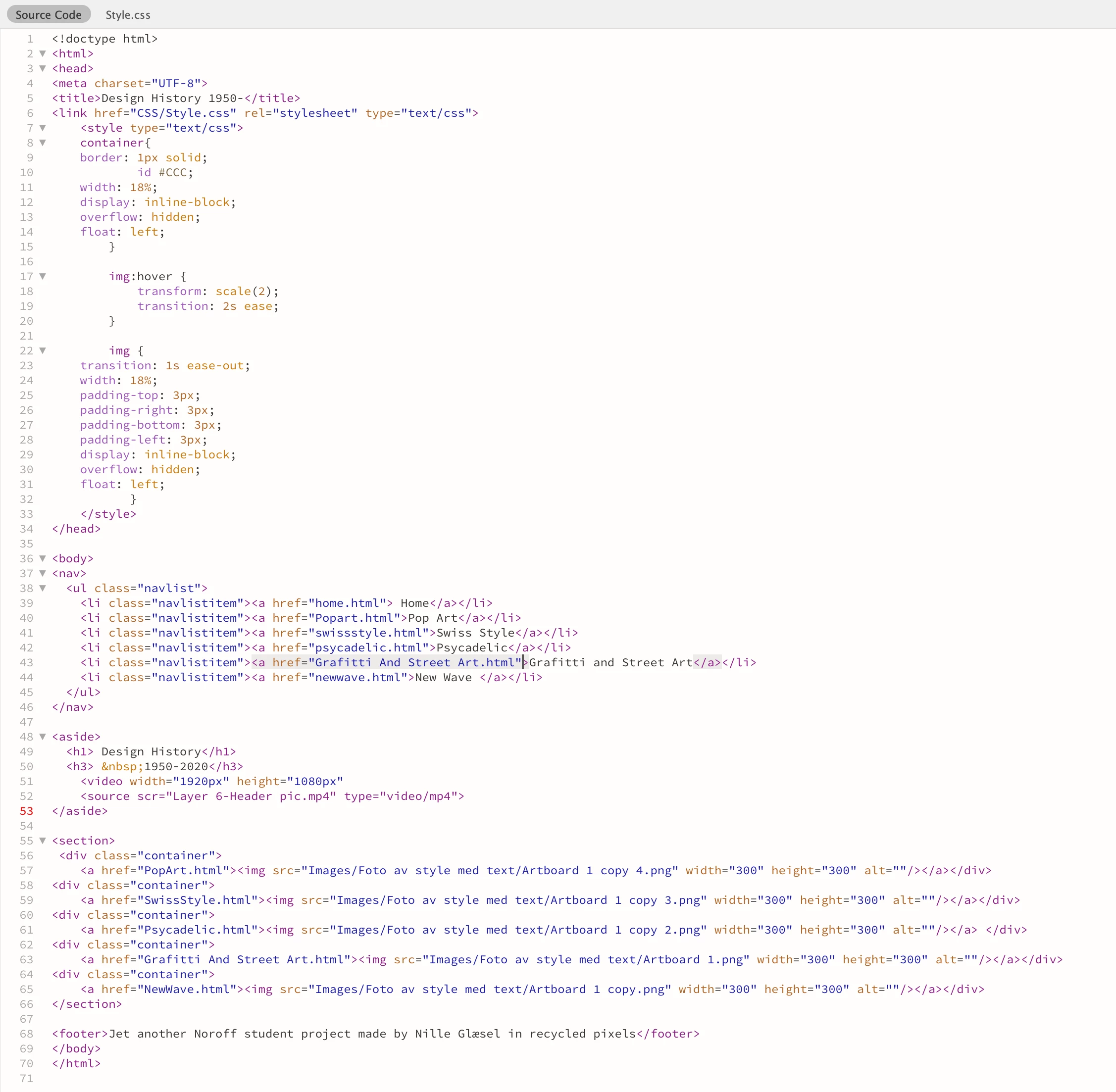
I want the images to float horizontally, but they shows up vertically in Dreamweaver.
What do I do wrong?

This topic has been closed for replies.

3 replies

Nancy OShea
Community Expert
Community Expert
January 3, 2020

We don't use floats much anymore.  It's not wrong to use floats but it's not modern.  With Flexbox you have more control over how things line up.

https://www.w3schools.com/css/css3_flexbox.asp


Nancy O'Shea— Product User & Community Expert
Jon Fritz
Community Expert
Community Expert
January 3, 2020

Try adding a . in front of the container class on line 8.

Class selectors start with a .
    Example: .container {}
ID selectors start with a #
    Example: #navigation {}
HTML element selectors are written without either
    Example: img {}

Legend
January 3, 2020

Good spot - I didn't see that missing period before the css container selector.

Legend
January 3, 2020

DW is/was not great at showing the actual layout correctly in Design View, although it may have improved in recent years, since I last used it.

Do the images show up horizontally when you view in the browser? I can't see anything wrong with your code.