Hosun
Inspiring
July 9, 2019
Answered

font [CSS font properties not being applied to final web page]

  • July 9, 2019
  • 1 reply
  • 895 views

Hi,

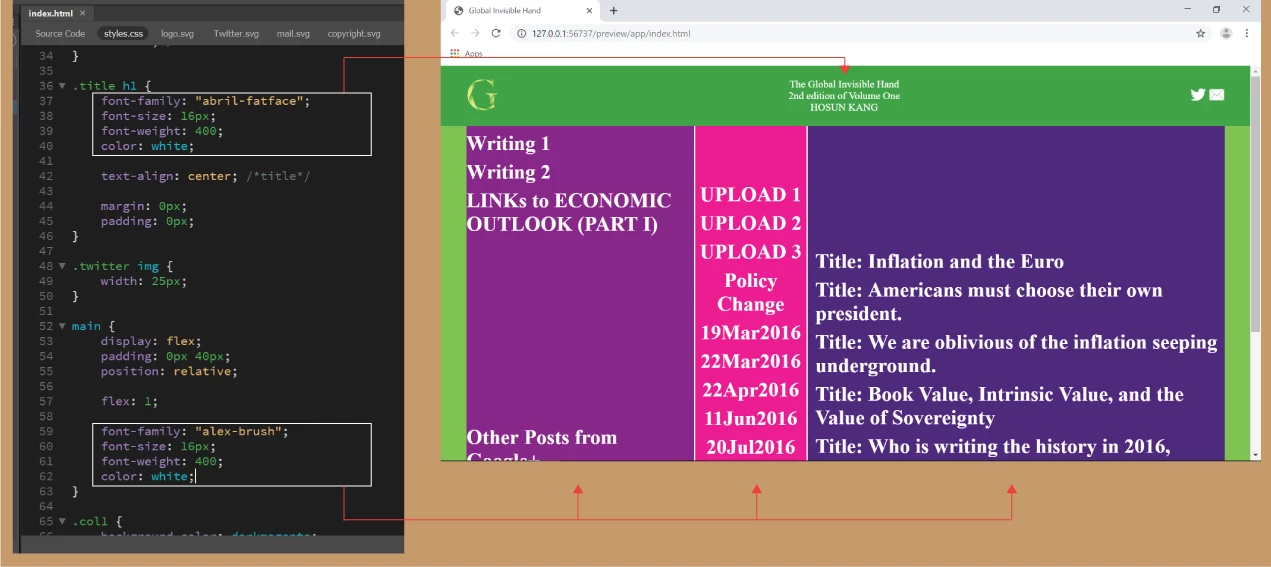
To ".title h1" and "main", I applied the same styles for font, except for font-family.

For "main", font-family is not applied.

How would I do?

Global Invisible Hand

Hosun Kang

This topic has been closed for replies.
Correct answer osgood_

You need to target the h1 inside the main section:

main h1 {

    font-family: "alex-brush";

    font-size: 16px;

    font-weight: 400;

    color: white;

}

However "alex-brush" isn't a 'web-safe' font and no-one but you will see it, if it is not installed on your website visitors system. You should only use 'web-safe' fonts, these include what you might find at google fonts - Google Fonts

Also you can't use multiple <h1> tag as you have done. <h> tags are reserved for headings and the <h1> tag should only be use once per section.

<h1>UPLOAD 2</h1>

<h1>UPLOAD 3</h1>

<h1>Policy Change</h1>

<h1>19Mar2016</h1>

So if you have multiple <article> tags in your page you can use 1 <h1></h1> tag per article tag:

<article>

<h1>Article 1 heading</h1>

</article>

<article>

<h1>Article 2 heading</h1>

</article>

<article>

<h1>Article 3 heading</h1>

</article>

or section tag

<section>

<h1>Section 1 heading</h1>

</section>

<section>

<h1>Section 2 heading</h1>

</section>

<section>

<h1>Section 3 heading</h1>

</section>

1 reply

osgood_Correct answer
Legend
July 9, 2019

You need to target the h1 inside the main section:

main h1 {

    font-family: "alex-brush";

    font-size: 16px;

    font-weight: 400;

    color: white;

}

However "alex-brush" isn't a 'web-safe' font and no-one but you will see it, if it is not installed on your website visitors system. You should only use 'web-safe' fonts, these include what you might find at google fonts - Google Fonts

Also you can't use multiple <h1> tag as you have done. <h> tags are reserved for headings and the <h1> tag should only be use once per section.

<h1>UPLOAD 2</h1>

<h1>UPLOAD 3</h1>

<h1>Policy Change</h1>

<h1>19Mar2016</h1>

So if you have multiple <article> tags in your page you can use 1 <h1></h1> tag per article tag:

<article>

<h1>Article 1 heading</h1>

</article>

<article>

<h1>Article 2 heading</h1>

</article>

<article>

<h1>Article 3 heading</h1>

</article>

or section tag

<section>

<h1>Section 1 heading</h1>

</section>

<section>

<h1>Section 2 heading</h1>

</section>

<section>

<h1>Section 3 heading</h1>

</section>

Hosun
HosunAuthor
Inspiring
July 10, 2019

Hi,

Thank you very much for your instruction.

That is what I'd like to know, but hard to describe in a few words.

In red rectangle, I want to downsize the number to the text.

How would I do?

(Would I enclose the number with <div></div>?)

Global Invisible Hand

Hosun Kang

Legend
July 10, 2019

Hosun  wrote

In red rectangle, I want to downsize the number to the text.


Use  <span class="number">1</span> tag:

.number {

font-size: 15px;

}