MarlinKnight
Known Participant
March 19, 2018
Answered

Font selection sequence? [Possible Bug]

  • March 19, 2018
  • 1 reply
  • 2111 views

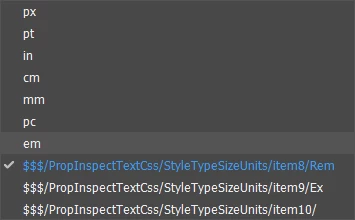
From the CSS Properties Inspector, the selected Font is Arial, size is 15px. Other choices include pt, in, cm, etc., but suddenly also includes:

$$$/PropInspectTextCss/StyleTypeSizeUnits/Item8/Rem

There are three of these entries, from "Item8" through "Item10." They don't do anything. What are they? Where did they come from and how can I get rid of them? Have tried everything, including uninstalling DW CC 2018 and reinstalling. Hope someone has a solution.

-- Marlin Knight

    This topic has been closed for replies.
    Correct answer Jon Fritz

    Hi, Ben,

    Per David's instructions i deleted the *.dat file, loaded DWCC 2018. Still had the problem. Shut everything down and booted the computer, Went directly and deleted the .dat file again. Loaded DW, still got the problem. Recreated the cache. No help.

    The numbered items in the drop down seem to point to a bad style sheet. Deleted those in a document to see what would happen. It killed everything in the font and formatting. Still got the problem. May be up the creek...


    That appears to be a bug in the program.

    My CC2018.1 also lists the last 3 entries that way...

    It looks like they're supposed to be the options for "rem", "ex" and "something" that's been completely truncated. The only way I could get them to appear though, was to add a # value to the Size attribute in the Properties window with text selected, then click the unit type dropdown menu that appeared after setting the Size.

    It looks as if the file being used by DW to create the unit type list likely had some kind of error introduced in the last update.

    1 reply

    BenPleysier
    Community Expert
    Community Expert
    March 19, 2018
    There are three of these entries, from "Item8" through "Item10." They don't do anything. What are they? Where did they come from and how can I get rid of them?

    Somebody has put them there, Unfortunately, I cannot replicate your problem because I do not have any numbered items.

    Maybe if you explained your problem a bit better, we may be able to help. Explanations with code and screen captures are very helpful.

    Wappler is the DMXzone-made Dreamweaver replacement and includes the best of their powerful extensions, as well as much more!
    MarlinKnight
    Known Participant
    March 19, 2018

    Here's from a "new" document. No code indicates any problem. See the Screen Shot from the prop inspector of the page:

    BenPleysier
    Community Expert
    Community Expert
    March 19, 2018

    Hi Martin,

    It looks like something has gone haywire. Please try following David's advice as per Deleting a corrupted cache file

    Wappler is the DMXzone-made Dreamweaver replacement and includes the best of their powerful extensions, as well as much more!