


Participant
October 23, 2025
Question

Footer Issues with Centering Lists

  • October 23, 2025
  • 3 replies
  • 96 views

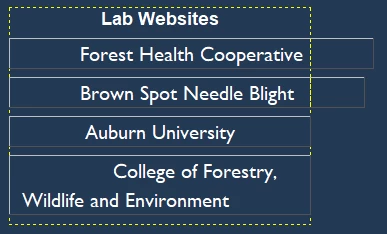
I've been working on the footer for my website and have all the links I need underneath the headers, but when I try to center it the longer links move over to the side and down like there's an indent. The shorter links center fine, it's just the longer ones. I'm trying to create a column based footer, where each section of links make up a column that goes across the page. Has anyone seen this before?



.container .main-section .article3 {
	width: 300px;
	float: left;
	color: #FFFFFF;
	text-align: center;
	margin-left: 50px;
	margin-right: 90px;
	position: absolute;
}

.main-section .article3 h3 {
	font-family: Gotham, "Helvetica Neue", Helvetica, Arial, sans-serif;
}

.main-section .article3 .footer {
	list-style-type: none;
	text-align: center;
	float: none;
	font-family: Gotham, "Helvetica Neue", Helvetica, Arial, sans-serif;
	padding-bottom: 0px;
	margin-top: 10px;
	margin-bottom: 10px;
	width: 300px;
	display: table;
	font-size: medium;
	position: absolute;
}
.article3 .footer li {
	margin-bottom: 10px;
	text-align: center;
	width: 300px;
	float: left;
	list-style-type: none;
	display: table-cell;
	position: relative;
	vertical-align: middle;
	max-width: 300px;
}​
<article class="article3">
	<h3>Lab Websites</h3>
	     <ul class="footer">
<li><a href="https://www.auburn.edu/academic/forestry_wildlife/foresthealthcooperative/">Forest Health Cooperative</a></li>

<li><a href="https://www.auburn.edu/academic/forestry_wildlife/bsnb/index.html">Brown Spot Needle Blight</a></li>

<li><a href="https://www.auburn.edu/">Auburn University</a></li>

<li><a href="https://cfwe.auburn.edu/">College of Forestry, Wildlife and Environment</a></li>
		  </ul>
	  </article>​

3 replies

Legend
October 26, 2025

You're just over-engineering the css. All you need is:


.article3 {
width: 300px;
background-color: #19273a;
color: #fff;
padding: 12px;
}

.article3 h3 {
font-family: Gotham, "Helvetica Neue", Helvetica, Arial, sans-serif;
text-align: center;
}

.article3 .footer {
list-style: none;
font-family: Gotham, "Helvetica Neue", Helvetica, Arial, sans-serif;
margin: 10px 0;
padding: 0;
}
.article3 .footer li {
margin-bottom: 15px;
padding: 0;
text-align: center;
list-style: none;
}
.article3 .footer li a {
text-decoration: none;
color: #fff;
}
Jon Fritz
Community Expert
Community Expert
October 24, 2025

Without a complete rebuild of your site structure to go to Bootsrap, you should be able to add the following to your ".main-section .article3 .footer" CSS to get the indentation to stop...

   margin-left:0;
   margin-right:0;
   padding-left:0;
   padding-right:0;

If that doesn't do the trick, I'd need to see the rest of your css and html to figure out exactly what's causing it.

Nancy OShea
Community Expert
Community Expert
October 24, 2025

1. Nobody uses floats much anymore. Most modern responsive websites use CSS Flexbox or Grids, which have many advantages over old-fashioned floated columns.


2. You're using indented lists inside your columns. <ul><li> tags are indented by default.

Either use another tag or remove indenting from your footer column lists. 


This example is made with Bootstrap 5, mobile-first layout system. Bootstrap uses CSS Flexbox.

<footer>
<div class="container-fluid text-center">
<div class="row">
<!-- 1st column -->
<div class="col-md-6">
<h3 class="text-uppercase">About us</h3>
<p>Lorem ipsum.</p>
</div>
<!-- 2nd column -->
<div class="col-md-3">
<h5 class="text-uppercase">Links</h5>
<ul class="list-unstyled">
<li><a href="#">Link</a></li>
</ul>
</div>
<!-- 3rd column -->
<div class="col-md-3">
<h5 class="text-uppercase">Links</h5>
<ul class="list-unstyled">
<li><a href="#">This is a link</a></li>
<li><a href="#">This link is longer than the first</a></li>
<li><a href="#">This is link is longer than the previous two</a></li>
<li><a href="#">Link</a></li>
</ul>
</div>
</div>
</div>
</footer>


See Getting Started with Bootstrap 5.

https://www.w3schools.com/bootstrap5/bootstrap_get_started.php


Hope that helps.


Nancy O'Shea— Product User & Community Expert