Known Participant
December 3, 2020
Answered

Formatting a nested Div

  • December 3, 2020
  • 2 replies
  • 529 views

Hello Community,
I added a small div  inside another div, when I pick a background color or other formatting options  from the selector properties of the new div,  nothing happens. The new div does not accept any formatting.

what can I do to resolve this.

thank you 

.


    This topic has been closed for replies.
    Correct answer Nancy OShea

    Without seeing your code, it's impossible to guess what may be going on.


    1. Copy & paste the following code into a new, blank document and save to your local site folder as test.html. 

    This document contains embedded CSS styles and an inline style on the Column 2 <div>. 
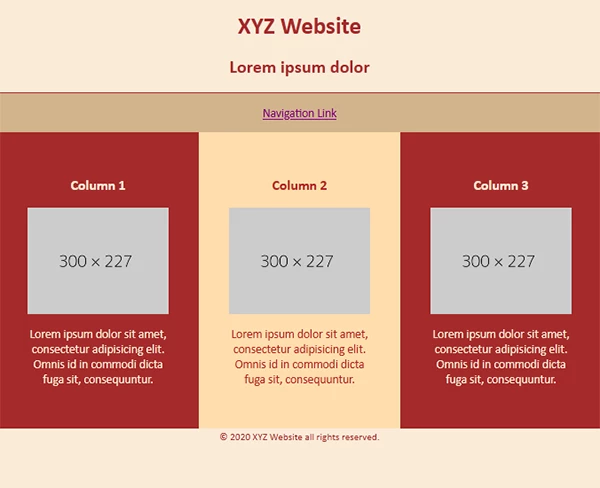
    2. Attempt to change any or all of the CSS values.

    3. Save document (Ctrl/Cmd+S) and refresh screen (F5).


    <!doctype html>
    <html lang="en">
    <head>
    <meta charset="utf-8">
    <title>Flexbox Columns</title>
    <meta http-equiv="X-UA-Compatible" content="IE=edge">
    <meta name="viewport" content="width=device-width, initial-scale=1">
    <style>
    body {
    margin: 0;
    padding: 0;
    background:antiquewhite;
    color:brown;
    text-align: center;
    }
    nav { 
    background-color:tan;
    padding:2%;
    border-top:1px solid brown;
    }
    nav a {color:purple;}
    
    /* Mobile first*/
    .flexbox-container {
    display: flex;
    flex-direction: column;
    }
    
    /* Tablets, Desktops*/
    @media only screen and (min-width: 630px) {
    .flexbox-container {
    flex-direction: row;
    justify-content: space-evenly;
    }
    }
    /* All devices */
    .flexbox-container > div {
    flex-grow: 1;
    padding: 5%;
    background-color:brown;
    color:antiquewhite;
    }
    img {
    max-width: 100%; 
    height: auto;
    display: block;
    vertical-align: baseline;
    margin: 0 auto;
    }
    </style>
    </head>
    <body>
    <header>
    <h1>XYZ Website</h1>
    <h2>Lorem ipsum dolor</h2>
    </header>
    
    <nav><a href="#">Navigation Link</a></nav>
    
    <main class="flexbox-container">
    <div>
    <h3>Column 1</h3>
    <img src="https://dummyimage.com/300x227" alt="placeholder">
    <p>Lorem ipsum dolor sit amet, consectetur adipisicing elit. Omnis id in commodi dicta fuga sit, consequuntur.</p>
    </div>
    
    <div style="background-color:navajowhite; color:brown">
    <h3>Column 2</h3>
    <img src="https://dummyimage.com/300x227" alt="placeholder">
    <p>Lorem ipsum dolor sit amet, consectetur adipisicing elit. Omnis id in commodi dicta fuga sit, consequuntur.</p>
    </div>
    
    <div>
    <h3>Column 3</h3>
    <img src="https://dummyimage.com/300x227" alt="placeholder">
    <p>Lorem ipsum dolor sit amet, consectetur adipisicing elit. Omnis id in commodi dicta fuga sit, consequuntur.</p>
    </div>
    
    </main><!--/flex-container-->
    
    <footer> <small>© 2020 XYZ Website all rights reserved.</small> 
    </footer>
    </body>
    </html>


    Do you see your style changes?

     

    2 replies

    Nancy OShea
    Community Expert
    Nancy OSheaCommunity ExpertCorrect answer
    Community Expert
    December 3, 2020

    Without seeing your code, it's impossible to guess what may be going on.


    1. Copy & paste the following code into a new, blank document and save to your local site folder as test.html. 

    This document contains embedded CSS styles and an inline style on the Column 2 <div>. 

    2. Attempt to change any or all of the CSS values.

    3. Save document (Ctrl/Cmd+S) and refresh screen (F5).


    <!doctype html>
    <html lang="en">
    <head>
    <meta charset="utf-8">
    <title>Flexbox Columns</title>
    <meta http-equiv="X-UA-Compatible" content="IE=edge">
    <meta name="viewport" content="width=device-width, initial-scale=1">
    <style>
    body {
    margin: 0;
    padding: 0;
    background:antiquewhite;
    color:brown;
    text-align: center;
    }
    nav { 
    background-color:tan;
    padding:2%;
    border-top:1px solid brown;
    }
    nav a {color:purple;}
    
    /* Mobile first*/
    .flexbox-container {
    display: flex;
    flex-direction: column;
    }
    
    /* Tablets, Desktops*/
    @media only screen and (min-width: 630px) {
    .flexbox-container {
    flex-direction: row;
    justify-content: space-evenly;
    }
    }
    /* All devices */
    .flexbox-container > div {
    flex-grow: 1;
    padding: 5%;
    background-color:brown;
    color:antiquewhite;
    }
    img {
    max-width: 100%; 
    height: auto;
    display: block;
    vertical-align: baseline;
    margin: 0 auto;
    }
    </style>
    </head>
    <body>
    <header>
    <h1>XYZ Website</h1>
    <h2>Lorem ipsum dolor</h2>
    </header>
    
    <nav><a href="#">Navigation Link</a></nav>
    
    <main class="flexbox-container">
    <div>
    <h3>Column 1</h3>
    <img src="https://dummyimage.com/300x227" alt="placeholder">
    <p>Lorem ipsum dolor sit amet, consectetur adipisicing elit. Omnis id in commodi dicta fuga sit, consequuntur.</p>
    </div>
    
    <div style="background-color:navajowhite; color:brown">
    <h3>Column 2</h3>
    <img src="https://dummyimage.com/300x227" alt="placeholder">
    <p>Lorem ipsum dolor sit amet, consectetur adipisicing elit. Omnis id in commodi dicta fuga sit, consequuntur.</p>
    </div>
    
    <div>
    <h3>Column 3</h3>
    <img src="https://dummyimage.com/300x227" alt="placeholder">
    <p>Lorem ipsum dolor sit amet, consectetur adipisicing elit. Omnis id in commodi dicta fuga sit, consequuntur.</p>
    </div>
    
    </main><!--/flex-container-->
    
    <footer> <small>© 2020 XYZ Website all rights reserved.</small> 
    </footer>
    </body>
    </html>


    Do you see your style changes?


    Nancy O'Shea— Product User & Community Expert
    DWuser973Author
    Known Participant
    December 8, 2020

    Thank you for you help, yes I was able to see. all good now

    Jon Fritz
    Community Expert
    Community Expert
    December 3, 2020

    Usually that means you have an error in the code that is causing DW to display something other than what you expect

    Run the validation tool under Window > Results > Validation or go to http://validator.w3.org/nu to get a listing of any errors in your code. Fix anything that's structurally wrong with what you have and it should start working.

    If you have clean and valid code, please share it here (copy/paste) and describe the exact process you are using to add new css. Be sure to include the version of the program and OS you're running.