
October 11, 2012
Answered

FTP error - cannot make connection to host

  • October 11, 2012
  • 6 replies
  • 27247 views

I am a novice to web development and using Dreamweaver, in general.  I am trying to connect to a remote server from HostGator using an FTP connection.  I have followed all the steps listed on the Dreamweaver Tutorial/Help site and I am still having problems.  I tried troubleshooting based on the suggestions provided and nothing seems to work, i.e., disabling firewall, changing ports, etc.  When I "Test" the connection, I get an FTP error.  I've been working on this issue for 4 hours and can't seem to get anywhere.  Any help is much appreciated.  Thanks.

Using:

Windows 7

Dreamweaver CS6

McAfee Virus Protection

CenturyLink as internet provider
This topic is closed to new replies. Start a new post to keep the conversation going.
Correct answer Nancy OShea

Site > Manage Sites > New ... 

First, tell DW where to find your local site files.

C:\YourSiteName\

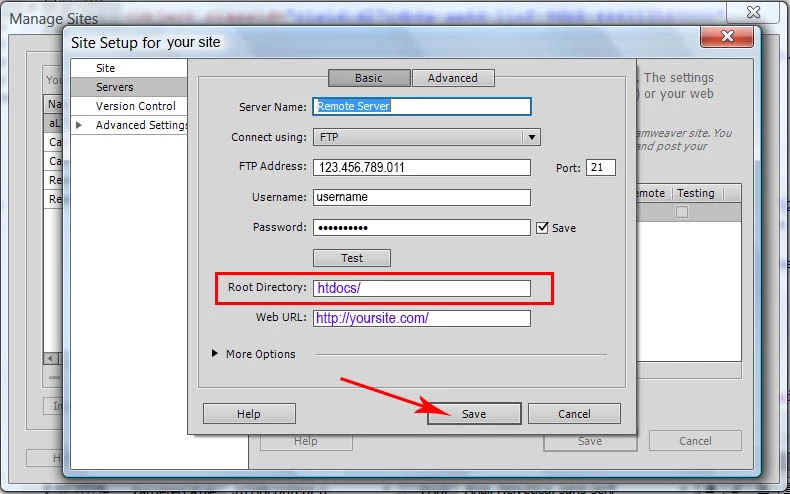
Then go to Servers and set up your Remote server details and log-in info.

I'm pretty sure HostGator uses public_html as your site root directory.  See screenshot below and change htdocs\ to public_html\

Nancy O.

6 replies

Ken_Binney
Inspiring
October 11, 2012

Are you working in a "Defined" site?

Have you tried to FTP with a 3rd party FTP like Filezilla?

October 11, 2012

What does a "Defined" site mean? Do I need to "Put" something?

No, I have not tired Filezilla. 

Ken_Binney
Inspiring
October 11, 2012

DW heavily depends on each site being defined in "Site Manager"

Can;t "put" any files until you get  your FTP working