
KellyCummings
Participant
August 16, 2021
Question

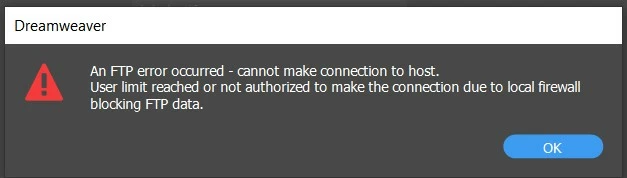
FTP Error Occured

  • August 16, 2021
  • 3 replies
  • 243 views

Please help.  I have been getting this message for a bit now.  I've tried on different computers, on different networks, etc.  I called Go Daddy and they have no clue.  I am usually able to just hit the save button, and all my changes will automatically be uploaded to the web.  I loved that feature.  Has anyone seen this error before and what does it mean? Thank you. 
 

    This topic has been closed for replies.

    3 replies

    Community Expert
    August 17, 2021

    You can also click on Site --> Advanced --> FTP Log the next time you try to make a transfer and see what the actual error number is that is being caught here. Sometimes these UI messages in DW are not all that helpful.

    B i r n o u
    Legend
    August 16, 2021

    you can also try the FTP troubleshoot online help, if it has not already been done

    https://helpx.adobe.com/dreamweaver/kb/troubleshoot-ftp-issues-dreamweaver-cs6-cc.html

    Nancy OShea
    Community Expert
    Community Expert
    August 16, 2021

    Can you connect to your hosting server with free FileZilla S/FTP client?

    If not, the problem is NOT Dreamweaver. 


    Nancy O'Shea— Product User & Community Expert
    KellyCummings
    Participant
    August 18, 2021

    yes, I did have to end up getting Filezilla and it worked, but I love love love the feature in Dreamweaver where I can just hit save and changes are immediately uploaded.  It's a one step process rather than two steps. 

    Nancy OShea
    Community Expert
    Community Expert
    August 20, 2021

    I hate auto upload on save. It's too risky.  One careless save could bring down the live site.  I can't afford to work that way.  That said, chances are your DW site definition file is corrupted.  Try creating a new one. 


    Nancy O'Shea— Product User & Community Expert