



limakid2015
Inspiring
May 16, 2023
Answered

FTP error when trying to upload files.

  • May 16, 2023
  • 1 reply
  • 544 views

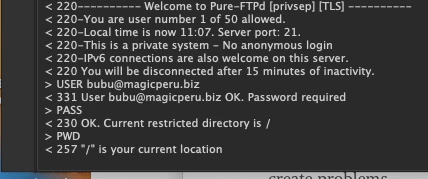
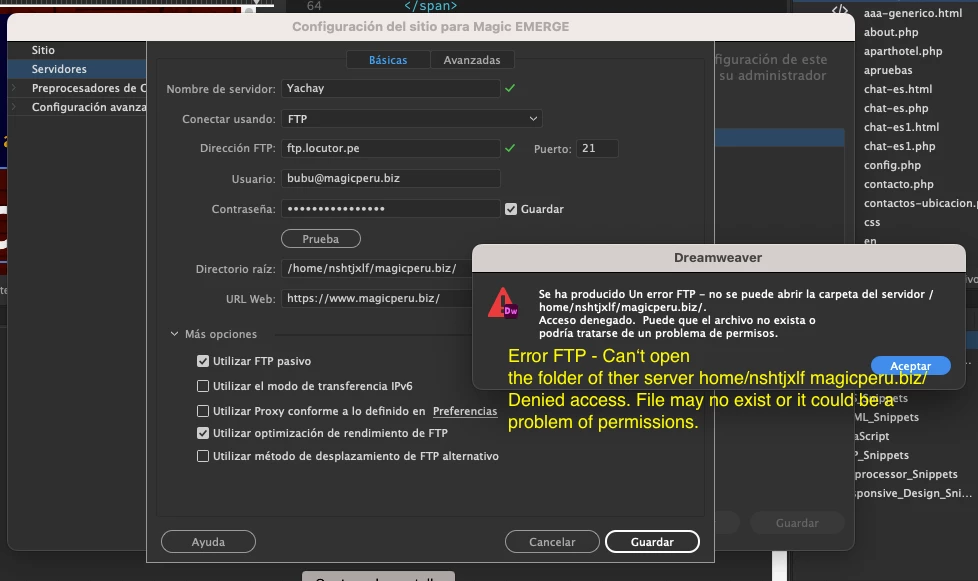
I am not sure if it is a bug. Fist time happening to me. The curious thing is that with Filezilla (other app to manage sites with FTP), all works fine, no issues. I don‘t undestand why with DW is happening this. Here are the two screenshots, one with the message error and other with the FTP log. 

I tried also deliting all and creating a new site. Some where I read that I have to match the clocks of the server and my equipment. Or should I report as a bug?  Adobe recommends to put the IP address on the URL Web field, but it is shared IP and I go it throught the address bar, I get an error message. In the control panel of my proviuder I gave permissions 777 (temporarily, of course), but nothing. Orientations, please.
 

This topic has been closed for replies.
Correct answer Nancy OShea

Your budget host might be using older connection protocols. 

Try reverting to a previous version of Dreamweaver. 


1 reply

Nancy OShea
Community Expert
Community Expert
May 16, 2023

I think you have entered the wrong root directory.  If unsure, ask your hosting provider what root directory to use.

See my screenshot below as an example.


Click the TEST button to confirm connection.  Failing that, click on More Options.  See screenshot.


Hope that helps.  Post back if you more questions.


Nancy O'Shea— Product User & Community Expert
limakid2015
Inspiring
May 21, 2023

public_html is the rrot folder for my main site. For other secondary sites I use the root folder, the path they tell me and is correct because with even few data, few information I supplied, I could upload my files using FILEZILLA. I tried to do it in DW, going for all the possible combinations of the web root directory with slash, without slash, but no success.

I will report it to DW next time they launch me the survey for recommendation. Or maybe inthe advanced settings tab, Do I hace to configure something? ASP server... etc. or just nothing is OK? I am using econocmic server of the provider, shared hosting Linux environment. Thank U.

Nancy OShea
Community Expert
Nancy OSheaCommunity ExpertCorrect answer
Community Expert
May 21, 2023

Your budget host might be using older connection protocols. 

Try reverting to a previous version of Dreamweaver. 


Nancy O'Shea— Product User & Community Expert
