
Inspiring
February 1, 2021
Answered

ftp files from Dreamweaver current version to Godaddy

  • February 1, 2021
  • 1 reply
  • 1744 views

I purchased Dreamweaver in Nov 2020, so have current version.   I have a MacOS Mojave 10.14.6

I have been using Dreamweaver for over ten years, and have set up 5 sites way back when on godaddy.

Back then you could have a main site with other sites in subfolders under them.  

Suddenly I cannot ftp to godaddy from any of the sites.  I get "cannot connect to host" if I use the "put" menu item within dreamweweaver.  If I go to Manage Sites, and click on Servers, and click "test", I get error message "cannot connect to host...user name or password is incorrect".  The username is shown, but the password is the normal stars when not visible.  This password was set up so many years ago I don't know it, and I am afraid to guess for fear of wiping out the correct password.  When I call godaddy they say they don't support Dreamweaver and I have to call Adobe.  

The only other wrinkle in all this, is that I had had a version of Dreamweaver previously to my November purchase.  When I purchased Dreamweaver in November, it worked for a week and then would not load.  It took me two months and several calls to Adobe to get that straightened out so it would load.  Now I have access to Dreamweaver, but cannot ftp to godaddy.

Please help.
 

    This topic has been closed for replies.
    Correct answer Nancy OShea

    Can you connect with FileZilla? 

    Are you sure you have the correct log-in credentials? 


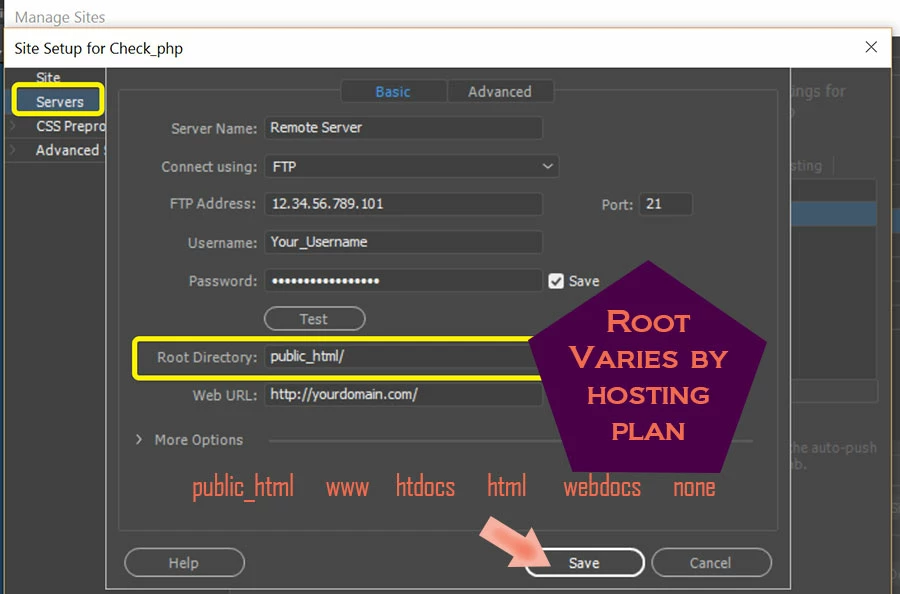
    Double check with GoDaddy as they are notorious for resetting server permissions and not telling their customers.  Also your root directory varies by hosting plan. GoDaddy typically uses public_html for their Linux hosting plans but something different on Win IIS. 


    Go to Site > New Site and create a new site definition.


    Post back if you still need help.


    1 reply

    Nancy OShea
    Community Expert
    Nancy OSheaCommunity ExpertCorrect answer
    Community Expert
    February 1, 2021

    Can you connect with FileZilla? 

    Are you sure you have the correct log-in credentials? 


    Double check with GoDaddy as they are notorious for resetting server permissions and not telling their customers.  Also your root directory varies by hosting plan. GoDaddy typically uses public_html for their Linux hosting plans but something different on Win IIS. 


    Go to Site > New Site and create a new site definition.


    Post back if you still need help.


    Nancy O'Shea— Product User & Community Expert
    Inspiring
    February 2, 2021

    I would have to download fileZilla and learn how to use it.  will do if I have to.

    [links removed by moderator.]

    I will put in bold how this was filled out for years and worked, 

    [removed by moderator.]

    I do think they might have changed my sites over to a linux server sometime last year.  I am not sure.


    here is what I have had working for years:

    server name:  go daddy

    connect using: FTP

    [removed by moderator.] (when I ask go daddy what my FTP address is, because one of my sites has numbers here, they say FTP address is a Dreamweaver term and they don't know.). so if there another way to ask them this question?


    username:   a user name. ( the user name I am not showing here, but is visible when I look at site)

    password:   a pass word.   (this password is a group of stars, and save is checked). I haven't touched user name or password in years.  And yet now when I try test within the site setup it says cannot connect to host.  login or password incorrect.  Please check connection information". When I called go daddy to verify username and password, they tell me I don't have a username or password or a way to change it.  I cannot understand if the username and password is just for the ftp, or if it was a user name or password for the creation of the site.  ).  

    [removed by moderator.] I tried changing to  public_html/  and also    /public_html/   but that didn't work.  but maybe I needed to reference this was a subdomain?  Not sure how to do that.  

    [removed by moderator.]

    another sub domain I have which also suddenly won't work is below. Has the same info as above site, except for web url:        Not sure why web url for above site  has ftp:... and this one has  written out http://......

    [removed by moderator.]

    use passive FTP   is checked

    use ftp preformance optimization is checked 


    any further help  as to how you think I could figure this out or comments would be appreciated.  


    [Sensitive information removed by moderator for OP's protection.]

    Nayan_Kankariya
    Community Manager
    Community Manager
    February 2, 2021

    Hi @sharonk39116496 ,


    Thanks for providing additional details. Are you able to login to GoDaddy portal and confirm the address or the IP of the site. We can have a remote connect session(details sent in a private message) at convinient time to you to further debug the issue and try resolving the issue.


    Have a pleasant day!


    Regards,

    Nayan

    Dreamweaver Team