
Participant
January 30, 2022
Answered

FTP local and remote files window, an obsessive-compulsive question

  • January 30, 2022
  • 2 replies
  • 202 views

The FTP window shows the remote files on the left.

Filezilla and for many other situations I keep the local stuff (or the original stuff) on the left.
Is this possible in Dreamweaver CS6 FTP?

    This topic has been closed for replies.
    Correct answer Nancy OShea

    @Gene5E4F,

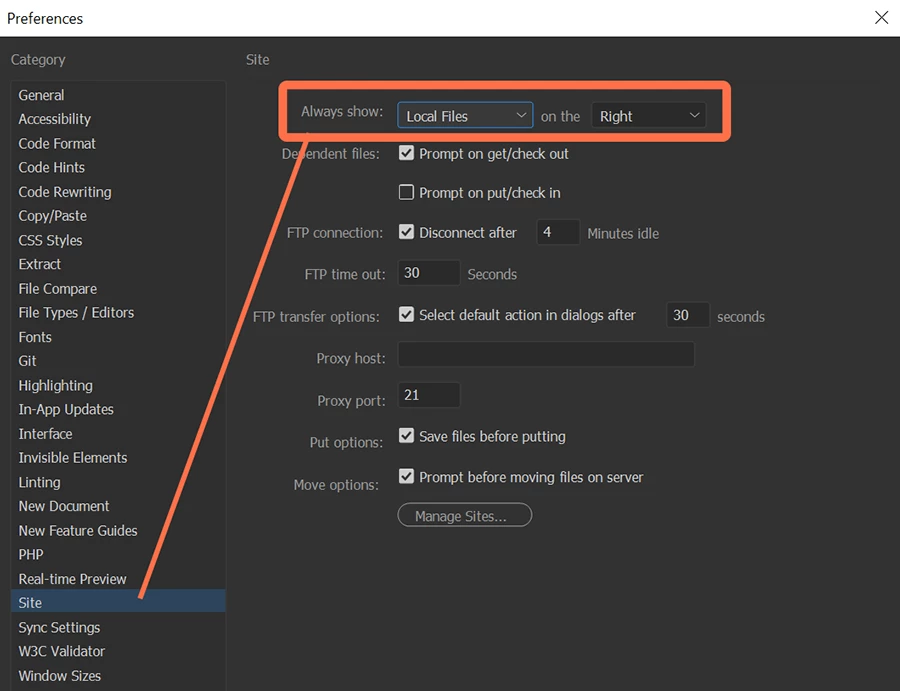
    As an update, it looks like I may have lied (unknowingly).  I don't know if this works in legacy Creative Suite 6 or not but in latest DW CC there is an option in Preferences > Site settings to switch sides.  It is possible to have Local site on left and Remote server on right.  See screenshot.
     

    Hope that helps.


    2 replies

    Nancy OShea
    Community Expert
    Nancy OSheaCommunity ExpertCorrect answer
    Community Expert
    February 2, 2022

    @Gene5E4F,

    As an update, it looks like I may have lied (unknowingly).  I don't know if this works in legacy Creative Suite 6 or not but in latest DW CC there is an option in Preferences > Site settings to switch sides.  It is possible to have Local site on left and Remote server on right.  See screenshot.


    Hope that helps.


    Nancy O'Shea— Product User & Community Expert
    Gene5E4FAuthor
    Participant
    February 2, 2022
    Works in CS6, great.
    Nancy OShea
    Community Expert
    Community Expert
    January 30, 2022

    I haven't used CS6 in over 10 years.  But modern DW CC 2022 does not allow Expanded Files Panels to swap places.  Remote Server is permanently displayed on the left side; Local Site is on the right. 


    Dedicated S/FTP clients like FileZilla and WS_FTP Pro use the reverse but it's never posed any problem for me.  Different tools have different interfaces. 


    DW is primarily a code editor with some file management tools added for convenience.


    Nancy O'Shea— Product User & Community Expert