Participant
April 23, 2021
Answered

FTP Server set-up

  • April 23, 2021
  • 3 replies
  • 1151 views

Beginner looking for guides on FTP connection, and server set-up best practices. I'm currently hosting my sites via virtual servers and cloud services. But well be move to an on-premise windows server soon. Thanks in advance. 

This topic has been closed for replies.
Correct answer Nancy OShea
quote

Beginner looking for guides on FTP connection, and server set-up best practices.

==========

Hi @Matthew Tanner,

Welcome to Dreamweaver.


I use commercial web hosting for three reasons: security, security and security.  Even for fully trained teams of IT experts, there are many challenges associated with setting-up and maintaining secure public-facing web servers.  And don't forget that you will need reliable backup servers in other regions (co-located) in case a disaster knocks out your primary server location.  This is not something you want to take on solo if you don't have to. 


Whatever your needs may be, there are plenty of safe, affordable & reliable commercial web hosting services available. 

https://www.pcmag.com/picks/the-best-web-hosting-services


Beginners & small businesses usually start with a basic shared hosting plan.  If needed, you can upgrade to costlier VPN or dedicated hosting later. 


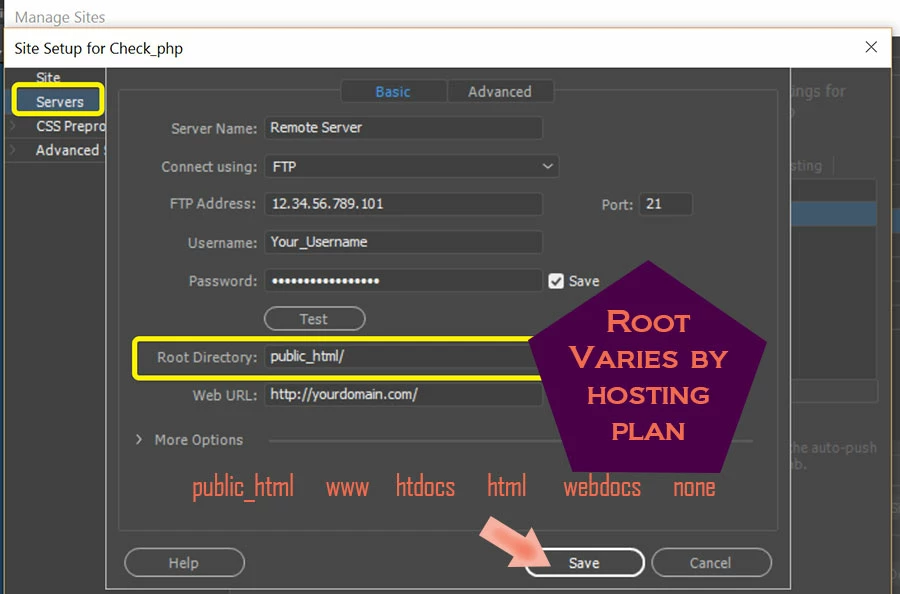
Once your commercial hosting is obtained,  it takes less than 5 minutes to connect DW to your hosting server via FTP, SFTP or FTP over SSL/TLS connection.  Ask your hosting provider for log-in details.  Enter those details in DW from Site > Manage Sites... Servers.  See screenshot.


Post back if you need more help.

 

3 replies

Nancy OShea
Community Expert
Nancy OSheaCommunity ExpertCorrect answer
Community Expert
May 28, 2021
quote

Beginner looking for guides on FTP connection, and server set-up best practices.

==========

Hi @Matthew Tanner,

Welcome to Dreamweaver.


I use commercial web hosting for three reasons: security, security and security.  Even for fully trained teams of IT experts, there are many challenges associated with setting-up and maintaining secure public-facing web servers.  And don't forget that you will need reliable backup servers in other regions (co-located) in case a disaster knocks out your primary server location.  This is not something you want to take on solo if you don't have to. 


Whatever your needs may be, there are plenty of safe, affordable & reliable commercial web hosting services available. 

https://www.pcmag.com/picks/the-best-web-hosting-services


Beginners & small businesses usually start with a basic shared hosting plan.  If needed, you can upgrade to costlier VPN or dedicated hosting later. 


Once your commercial hosting is obtained,  it takes less than 5 minutes to connect DW to your hosting server via FTP, SFTP or FTP over SSL/TLS connection.  Ask your hosting provider for log-in details.  Enter those details in DW from Site > Manage Sites... Servers.  See screenshot.


Post back if you need more help.


Nancy O'Shea— Product User & Community Expert
B i r n o u
Legend
May 28, 2021

I think all of us here use commercial, managed hosting servers that offer off-site backup services.


I don't know if in the United States the average user has self-hosted servers, but here in France virtual servers are legion, most users have abandoned shared servers that are interdependent on the roommates.


well this said, and although outsourcing take care of all the management and maintenance of the server ... to adjust and refine each domain in a flexible manner, SSH and the Linux console under Windows become a delight ... a child's play ... follow the log of a mailbox that fails, swap blacklists from one account to another, check the url of a cname or the ip of a type A ... etc ... wow ... thank you WSL


I may be wrong but dragging down the discussions will only impoverish the general culture of the forum in general... then it's up to the OPs to say... "sorry this doesn't meet my expectations, or could you please direct me to this or that... " but let's try to elevate the discussions... don't you think?

Nancy OShea
Community Expert
Community Expert
May 28, 2021
quote

I think all of us here use commercial, managed hosting servers that offer off-site backup services.


I may be wrong but dragging down the discussions will only impoverish the general culture of the forum in general...

=====

1. Right.  We all use commercial hosting for safety, convenience and efficiency.


2.  I have NO IDEA what that means or why you felt you needed to inject it here.  Perhaps we have another language barrier  -- déjà vu?


Nancy O'Shea— Product User & Community Expert
B i r n o u
Legend
May 28, 2021

Hello @Matthew Tanner , I'm glad that it helped you, and if you use SSH, if you're under Windows, have you heard about WSL...


well it's not only, SSH... it's a full command line terminal under windows... I don't remember how I did before... ;)... i'ts in one word.... genius


B i r n o u
Legend
April 23, 2021

wow, this is a completely different job than web developer. here on this forum, it is most web developper...


network and server administration is a task, which although it is simple when mastered, remains a job in its own right.
although today very ergonomic application interfaces allow to control the entire server, it is often preferable to use directly an SSH console, do you use and know SSH ?... it will be a plus


For my part I rely on the skills of an external team that manages, maintains and offers outsourcing of my servers.


perhaps that I missed your bottom line, what do you mean by 'set-up best parctices'... the entire server, or just the FTP part ?


Participant
May 28, 2021

I was just asking in general so no bottom line. Yes, I do use SSH, and have found my preferred settings for connecting. Thanks for relying, and we can leave the "setting up the entire server" for another conversation.