Inspiring
May 2, 2020
Answered

FTP Upgrade to TLS-1.2

  • May 2, 2020
  • 1 reply
  • 1733 views

Hello:


After being unable to upload files today using DW 2020's built-in FTP client, I asked my host/server about the continuous failure to upload. The technician wrote this to me:

> >  Hello Warren,

In order to improve the security associated with FTP service and to avoid attack targeting to its port, we have modified the server-wide security setting from "TLS-1.1" to "TLS-1.2". Due to this reason you are facing the FTP connectivity issue. Please make sure that your FTP client is latest and it uses TLS-1.2.
 
Assuming that DW 2020 has also upgraded to TLS-1.2, how do I activate that upgrade?
 
Thanks, in advance.
 
    This topic has been closed for replies.
    Correct answer Nancy OShea

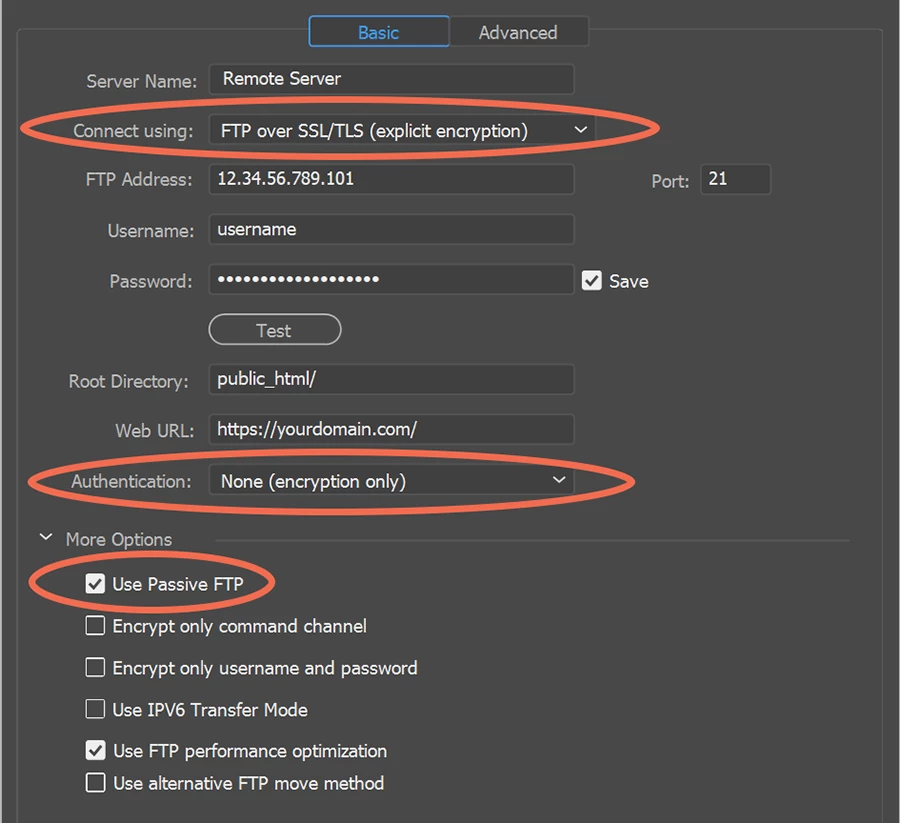
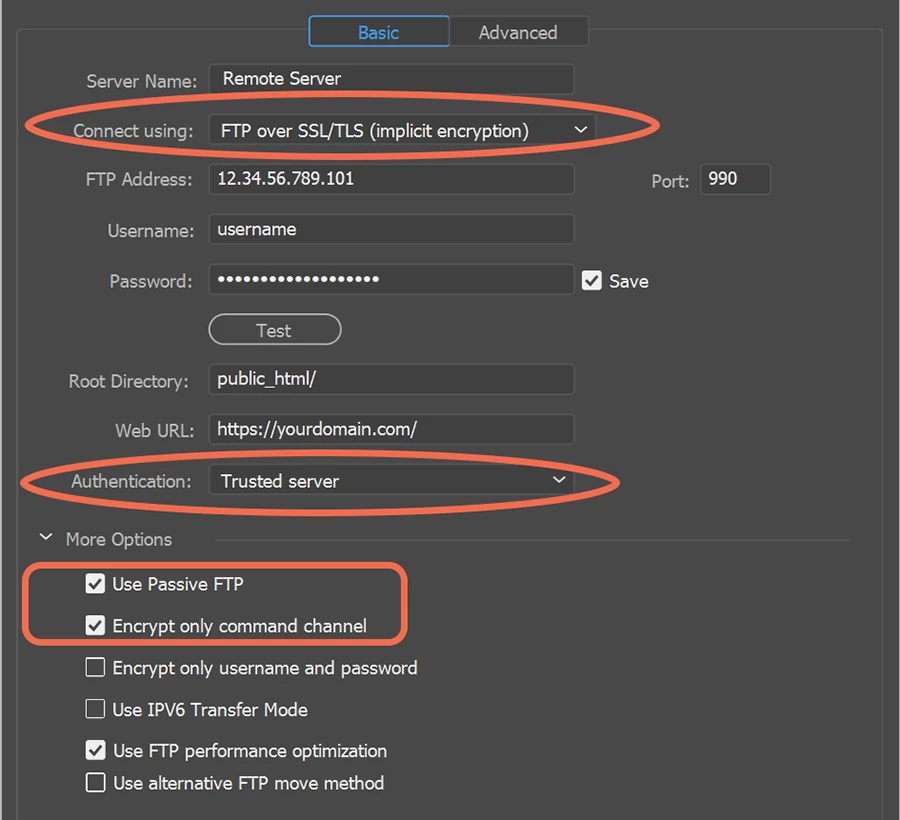
    There's nothing to upgrade.  Simply change your site definition settings to those recommended by your hosting provider.


    OPTION 1:  See screenshot.


    OPTION 2: See screenshot.


    OPTION 3: Use Filezilla client. It's free.

    https://filezilla-project.org/download.php


    1 reply

    Nancy OShea
    Community Expert
    Nancy OSheaCommunity ExpertCorrect answer
    Community Expert
    May 2, 2020

    There's nothing to upgrade.  Simply change your site definition settings to those recommended by your hosting provider.


    OPTION 1:  See screenshot.


    OPTION 2: See screenshot.


    OPTION 3: Use Filezilla client. It's free.

    https://filezilla-project.org/download.php


    Nancy O'Shea— Product User & Community Expert
    wcampAuthor
    Inspiring
    May 3, 2020

    Many thanks, Nancy!


    While Option 1 didn't work for me, Option 2 worked very well.


    Thanks, very much.


    Follow-up question: Do I need to reset a preference so I can receive emailed announcements when you or others respond to my inquiries? I ask because I didn't receive an e-message from you announcing that you'd e-replied to me eight hours ago. As you can see in my screenshot, I'd already selected the "Email me when someone replies" preference, however, no e-message from you was received. Hope you can help me with this follow-up inquiry.


    Thanks, in advance, Nancy.


    Warren


    . . .


    Nancy OShea
    Community Expert
    Community Expert
    May 3, 2020

    Glad SSL/TLS explicit worked for you.


    Regarding forum e-mail:

    1. Log-in and click on your Avatar (top, right toolbar image).

    2. Select Account settings.

    3. Click the Notifications tab.

    4. Adjust e-mail settings as desired.    

    5. Click the blue Save button.


    Nancy O'Shea— Product User & Community Expert