
Participant
November 9, 2020
Answered

Funny behavior with spacebar

  • November 9, 2020
  • 2 replies
  • 426 views

Using DW 2021, just updated itself. I am in CODE view with VBScript language option in the lower right pulldown.  When I tap the spacebar it does NOT insert a space like every other program in the world does, but it moves the entire line of code like 3 tabs to the right. Even if I try to insert a space somewhere in the middle of the line of code, the whole line moves tabs at a time.  I have another DW installed on another computer under my account, but it is 2020; it does not do this.  I tried to upload the settings from that one and load the setting from the cloud to the 2021 one, but nothing makes a difference unless I change the language to something else like HTML, but then the colors are not right.  I have compared Preference Settings across both computers and I can not figure this one out.  I rarely post to forums, but this one is driving me notes.

Thanks Ahead
    This topic has been closed for replies.
    Correct answer Nancy OShea

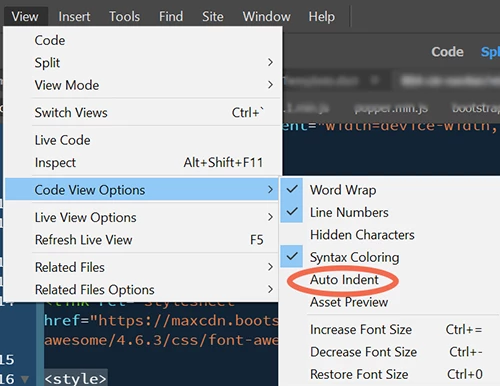
    Personally, I prefer left aligned code so I turn off auto indenting in View > Code View Options.  See screenshot.


    Check your Preferences > Code Format (Ctrl+U).


    2 replies

    Jon Fritz
    Community Expert
    Community Expert
    November 10, 2020

    When I set a page to VBScript as you descibe, and randomly choose a place to add a space, I'm not seeing the same results (DW 2021 under Windows 10).

    It could be an auto-indent issue, along with code errors, causing your specific code to get mangled by a confused DW (pretty much what Nancy is describing). In which cse, turning off auto-indent might do the trick.

    It could also be a bad installation of the program or a corrupt Preferences file.

    If you haven't yet, it may be worth Restoring Preferences to see if the odd behavior goes away.

    Nancy OShea
    Community Expert
    Nancy OSheaCommunity ExpertCorrect answer
    Community Expert
    November 10, 2020

    Personally, I prefer left aligned code so I turn off auto indenting in View > Code View Options.  See screenshot.


    Check your Preferences > Code Format (Ctrl+U).


    Nancy O'Shea— Product User & Community Expert
    Brian_LAXAuthor
    Participant
    November 10, 2020

    Nancy - That was it - Auto Indent checked; so simple....  I was so focuced on the PREFERENCES Section and then when it ONLY did it when VBScript language was selected, I thought those deep, dark JSON files 10 directories deep might come into play.  I did extensive earching, rearranging words and phrases before posting this, but found nothing. 

    Thank You So Much!   And you sound Irish too 🙂  

    Brian_LAXAuthor
    Participant
    November 29, 2020

    Just an update to this one as even after setting this preference I was still experiencing funny behavior in Code View where I would tap spacebar or tab and the cursor would move multiple, multiple tabs. I counted them once; it was like 28 tabs with a single key stroke; SUPER FRUSTRATING and Time-Consuming to reverse it. So another find and setting modification that has helped A LOT and essentially stopped this funny key stroke behavior and keeping me from jumping out of a window is a setting in [Brackets.json] located in:  C:\Program Files\Adobe\Adobe Dreamweaver 2021\Configuration\   A single setting was set to true and I changed to false  "smartIndent": false  

    That is when things got back to semi normal in Code View.  I just wanted to share as I had a real hard time finding a solution to a very frustrating DW experience.