


Inspiring
July 11, 2017
Answered

GIT is grey'd out/inactive

  • July 11, 2017
  • 4 replies
  • 3112 views

I'm running DW 2017.5 (build 9878) on Windows 7 Professional 64-bit SP1

I've downloaded and installed Git (2.13.2 - 64-bit)

DW did not seem to pick up the Git installation, even though everything is installed in default/standard directories.

So I manually set up Git as:
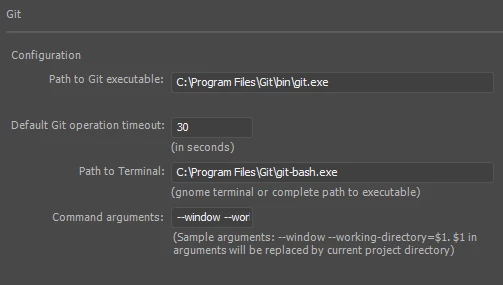
But in Site Manager, Git remains inactive. Rolling over the Git section pulls a tooltip that says "Please wait, Git is being initialized..." but I've waited 10 minutes and it never initializes.

What can I do to troubleshoot and "git" this working?

This topic has been closed for replies.
Correct answer carlsteinhilber

Turns out my local internet security service (Kaspersky) was blocking Dreamweaver.

I'm not entirely sure why it was specific/unique only to DW... since it sounds like DW utilizes the GIT exe(s) to handle all it's GIT operations, and using GIT directly (either GIT Bash or GIT GUI) worked just fine.

I believe I was able to config DW as an "approved application" in Kaspersky's config, and now have active GIT functionality in DW.

4 replies

carlsteinhilberAuthorCorrect answer
Inspiring
August 14, 2017

Turns out my local internet security service (Kaspersky) was blocking Dreamweaver.

I'm not entirely sure why it was specific/unique only to DW... since it sounds like DW utilizes the GIT exe(s) to handle all it's GIT operations, and using GIT directly (either GIT Bash or GIT GUI) worked just fine.

I believe I was able to config DW as an "approved application" in Kaspersky's config, and now have active GIT functionality in DW.

Participant
September 23, 2017

Where would I find this on the computer?

Preran
Legend
July 17, 2017

Was your issue resolved? If not, can you provide us with the information requested in the previous post by Archana?

Thanks,

Preran

Inspiring
July 13, 2017

I completely uninstalled DW (and blow away all settings), completely uninstalled Git.

Reinstalled Git (using default directory and settings), reinstalled DW...

Still same issue. Setting up a new site, the entire Git section of the Site Setup dialog is grey'd out.

I can launch Git Bash and connect to repos and all, so I'm fairly confident that Git is installed correctly.

Adobe Employee
July 14, 2017

Hi Carlsteinhilber,

          Can you open this folder Unnames Site 2 in your system outside DW, enable show hidden files and check if you can see a .git folder in it? If yes, this folder Unnamed Site 2 is already a git repository and thus you are seeing your options grayed out in the Site set up dialogue.

          You could go back to the site set up dialogue, click on the folder icon and create a new folder or select a different one which is not a repository already. You will then see the associate a git repo options as enabled.

          Do try this and let us know if it helps.

Thanks,

Archana Kaur,

DW Team

BenPleysier
Community Expert
Community Expert
July 11, 2017
Wappler is the DMXzone-made Dreamweaver replacement and includes the best of their powerful extensions, as well as much more!
Inspiring
July 13, 2017

Yes indeed.

I already had Git installed and an account set up. But when I couldn't get it to work, I went ahead and uninstalled Git and reinstalled from scratch just to make sure that I was using the right version/build and had no superfluous junk.

Still grey'd out.