Inspiring
July 24, 2019
Answered

Good Ol' Classic ASP question with DW

  • July 24, 2019
  • 2 replies
  • 4167 views

I know this question may go back a few years, but...

I'm currently using the latest version of DW (CC 2019)....

I support a lot of Classic ASP pages....and while I know DW doesn't support Classic ASP anymore, my request is just this:

When I open a .asp page and start to code, or hit return to go to next line, the spacing acts weird. For instance, if I start changing/adding some code in the middle of an existing line of code - it might "jump" that entire line of code over several tabs....I find myself entering the code, and then SHIFT Tabbing the code back to the left...

I've switched the dropdown to VBScript so at least the code color looks better...but I would love to be able to type without it pushing the code to the right all the time....

Any thoughts on this?

    This topic has been closed for replies.
    Correct answer Nancy OShea

    Go to View > Code View Options.  Disable Auto Indent.

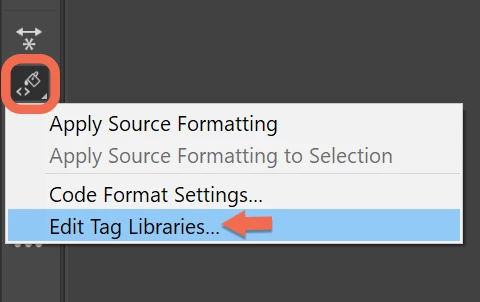
    Next, on the Common Toolbar, click the Apply Source Formatting icon.  But before you apply formatting you need to open the Tag Library Editor to define your code formatting (with or without indents, etc...).

    2 replies

    Nancy OShea
    Community Expert
    Community Expert
    July 24, 2019

    Classic ASP which released in 1998 is outdated.  Most developers migrated away from ASP to ASP.Net for security reasons.  I think you will be hard pressed to find any modern IDE that fully supports ASP Classic anymore.   Best advice,, revert to an older version of DW if you still can.

    Nancy O'Shea— Product User & Community Expert
    Inspiring
    July 24, 2019

    Yes, Nancy - I'm fully aware it's outdated. And while most developers have migrated away from it, it doesn't change the fact that many developers still support legacy applications.

    Notepad++ supports Classic ASP, but my question really wasn't about supporting the coding language (intelli-sense, etc) - it simply was to "disable" the way DW shifts code around....I don't want it to "space" the code....seems simply enough....I guess not.

    Jon Fritz
    Community Expert
    Community Expert
    July 24, 2019

    Unfortunately, there's no way to turn off code-indentation for specific file types. In DW, it's all or nothing under....

    1. Edit > Preferences > Code Format
    2. Uncheck Indent
    3. Click Apply

    Does that have any effect on it (I'm not on a Mac and don't work with ASP)?

    HARSHIKA_VERMA
    Community Manager
    Community Manager
    July 24, 2019

    Hi David,

    Thank you for reaching out and sharing your feedback. We'd like to confirm if this is what you're looking for? Why did you remove classic asp from CC 2017? – Adobe Dreamweaver: Feature Ideas If yes, please upvote this feature and add your voice.

    Please let us know if you've any issues with this.

    Thanks,

    Harshika