
Participant
August 24, 2018
Answered

Größe meiner html-Seite, Skalierung und Zoom / html Page Size, Scaling and Zoom

  • August 24, 2018
  • 2 replies
  • 1067 views

Dreamweaver CS5

(Ich bin mir gerade nicht sicher, ob dies Forum hier deutsch oder englisch ist; nutze daher beides / Not sure, if I have to post in English or German. So I'll take both:)

Anbei ein Screenshot, der das Problem beschreiben soll: / The following screenshot may demonstrate my problem:
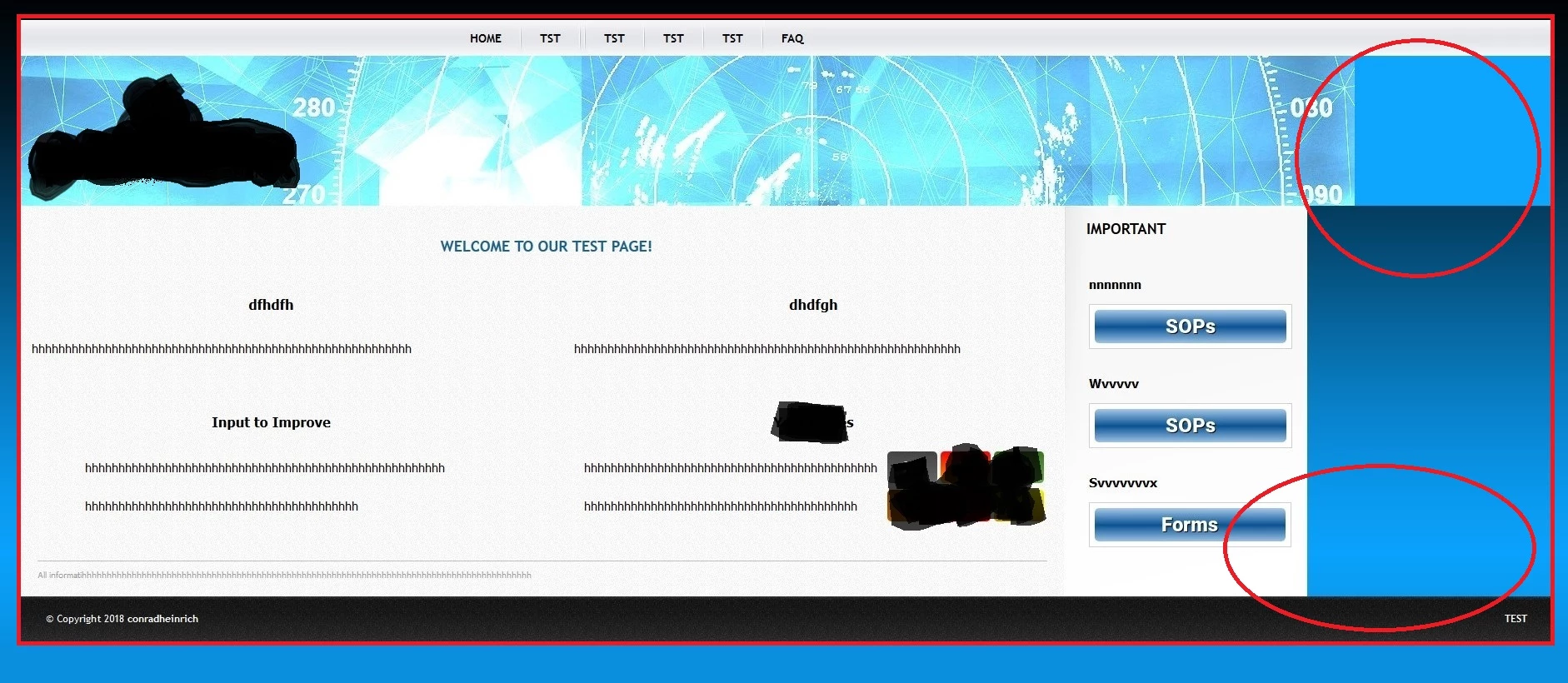
Wie man hoffentlich erkennt, wachsen die Kopf- und Fußzeile und der darunterliegende Grafikteil mit (rote Kreise), während der Rest, als der mittige grauhinterlegte Inhaltsbereich es nicht macht. / Hope tt you see the different sized elements. Footer, headline and graphic below grow with zooming in, spoiling the view in total.

Oben ist im Browser eine Darstellung von 100% voreingestellt. Erst bei c.a. 120% ergibt sich ein 'gleichmäßiges' Bild (Abbild unten, rot eingerahmt): / Browser view with 100% zoom above, 120% below. With 120% it looks like it has to look like (red frame marks the 'closed' window without different growing elements as above):

Am liebsten würde ich eine Größe festlegen, die sich an die Fenstergröße anpasst. In der Entwurfsansicht während der Bearbeitung ist das auch der Fall - nur in der tatsächlichen Darstellung am Ende nicht. Es sollte also quasi immer so aussehen, wie im zweiten Screenshot. Was kann ich da machen? / Would like to have it 'always' sized as shown on the second screenshot, independent of the screen's resolution. But how to do?

Vielen Dank im Voraus! / Thx in advance!

(... und entschuldigt das plumpe Ausschwärzen des Inhalts... / ...and sorry for the cheap outlining of the content...)

    This topic has been closed for replies.
    Correct answer conradheinrich

    Everyone - thanks a lot for the quick response! Guess I'm an absolut beginner. I'm pretty lost in this coding....

    Here's the code to the page shown above:

    <!DOCTYPE html>

    <head>

    <meta http-equiv="Content-Type" content="text/html; charset=utf-8"/>

    <title>test</title>

    <link href="css/style.css" rel="stylesheet" type="text/css"/>

    <style type="text/css">

    .Stil3 {font-weight: bold}

    .Stil1 {

        color: #FF0000;

        font-weight: bold;

    }

    </style>

    </head>

    <body>

        <!-- header -->

        <div id="menu">

          <div id="menu_list"><a href="#">test</a>

            <img src="images/splitter.gif" class="splitter" alt="" />

            <a href="#">test</a></div>

        </div>

        <div id="header"></div>

        <!--end header -->

        <!-- main -->

        <div id="main">

              <div id="sidebar">

                  <h1>Important</h1>

                <div class="item">

                  <table width="100%" border="0">

                    <tr>

                      <td> </td>

                    </tr>

                    <tr>

                      <td><h2>important1</h2></td>

                    </tr>

                    <tr>

                      <td> </td>

                    </tr>

                    <tr>

                      <td> </td>

                    </tr>

                    <tr>

                      <td><h2><strong>important2</strong></h2></td>

                    </tr>

                    <tr>

                      <td> </td>

                    </tr>

                    <tr>

                      <td> </td>

                    </tr>

                    <tr>

                      <td><h2><strong>important3</strong></h2></td>

                    </tr>

                    <tr>

                      <td> </td>

                    </tr>

                  </table>

                </div>


              </div>

              <div id="text" >

                <table border="0">

                  <tr>

                    <td width="575"> </td>

                    <td width="68"> </td>

                    <td width="575"> </td>

                  </tr>

                  <tr>

                    <td colspan="3"><div align="center">

                      <h1>welcome</h1>

                    </div></td>

                  </tr>

                  <tr>

                    <td> </td>

                    <td> </td>

                    <td> </td>

                  </tr>

                  <tr>

                    <td> </td>

                    <td> </td>

                    <td> </td>

                  </tr>

                  <tr>

                    <td><div align="center">

                      <h3><strong>text</strong></h3>

                    </div></td>

                    <td><div align="center"></div></td>

                    <td><div align="center">

                      <h3><strong>text</strong></h3>

                    </div></td>

                  </tr>

                  <tr>

                    <td> </td>

                    <td> </td>

                    <td> </td>

                  </tr>

                  <tr>

                    <td><div align="justify"></div></td>

                    <td> </td>

                    <td><div align="justify"></div></td>

                  </tr>

                  <tr>

                    <td> </td>

                    <td> </td>

                    <td> </td>

                  </tr>

                  <tr>

                    <td> </td>

                    <td> </td>

                    <td> </td>

                  </tr>

                  <tr>

                    <td> </td>

                    <td> </td>

                    <td> </td>

                  </tr>

                  <tr>

                    <td><div align="center">

                      <h3><strong>text</strong></h3>

                    </div></td>

                    <td> </td>

                    <td><div align="center">

                      <h3><strong>text</strong></h3>

                    </div></td>

                  </tr>

                  <tr>

                    <td> </td>

                    <td> </td>

                    <td> </td>

                  </tr>

                  <tr>

                    <td> </td>

                    <td> </td>

                    <td> </td>

                  </tr>

                  <tr>

                    <td> </td>

                    <td> </td>

                    <td> </td>

                  </tr>

                </table>

                <div align="center"></div>

                <p class="additional">text</p>

          </div>

        </div>

        <!-- end main -->

        <!-- footer -->

        <div id="footer">

        <div id="left_footer">&copy; text

        </div><div id="right_footer"><strong><a href="nnn">text</a></strong><a href="nnn"><strong></strong></a></div>

    </div>

        <!-- end footer -->

    </body>

    </html>

    2 replies

    Nancy OShea
    Community Expert
    Community Expert
    August 24, 2018

    Use a width of 100% or the Bootstrap container-fluid class.

    Example:

    <!doctype html>

    <html lang="en">

    <head>

    <meta charset="utf-8">

    <title>Bootstrap 4</title>

    <meta http-equiv="X-UA-Compatible" content="IE=edge">

    <meta name="viewport" content="width=device-width, initial-scale=1">

    <!--Bootstrap 4 CSS-->

    <link href="https://maxcdn.bootstrapcdn.com/bootstrap/4.0.0-beta/css/bootstrap.min.css" rel="stylesheet" integrity="sha384-/Y6pD6FV/Vv2HJnA6t+vslU6fwYXjCFtcEpHbNJ0lyAFsXTsjBbfaDjzALeQsN6M" crossorigin="anonymous">

    </head>

    <body class="container-fluid">

    <nav class="row bg-dark text-white">

    Navigation

    </nav>

    <header class="row bg-info text-white">

    Header

    </header>

    <main class="row">

    <div class="col-md-5 bg-warning">

    <h3>Column 1</h3>

    <p>Lorem ipsum dolor sit amet, consectetur adipisicing elit.!</p></div>

    <div class="col-md-5 bg-danger text-white">

    <h3>Column 2</h3>

    <p>Lorem ipsum dolor fuga quaerat doloribus molestiae recusandae numquam autem, quidem sed laudantium?</p> </div>

    <div class="col-md-2 bg-primary text-white">

    <h3>Column 3</h3>

    <p>Tempora amet optio facere expedita nihil asperiores est nesciunt. </p> </div>

    </main>

    <footer class="row bg-dark text-white">

    Footer

    </footer>

    <!--latest jQuery Core-->

    <script src="https://code.jquery.com/jquery-3.2.1.min.js" integrity="sha256-hwg4gsxgFZhOsEEamdOYGBf13FyQuiTwlAQgxVSNgt4=" crossorigin="anonymous"></script>

    <!--Popper JS-->

    <script src="https://cdnjs.cloudflare.com/ajax/libs/popper.js/1.11.0/umd/popper.min.js" integrity="sha384-b/U6ypiBEHpOf/4+1nzFpr53nxSS+GLCkfwBdFNTxtclqqenISfwAzpKaMNFNmj4" crossorigin="anonymous"></script>

    <!--latest Bootstrap 4 JS-->

    <script src="https://maxcdn.bootstrapcdn.com/bootstrap/4.0.0-beta/js/bootstrap.min.js" integrity="sha384-h0AbiXch4ZDo7tp9hKZ4TsHbi047NrKGLO3SEJAg45jXxnGIfYzk4Si90RDIqNm1" crossorigin="anonymous"></script>

    </body>

    </html>

    Nancy O'Shea— Product User & Community Expert
    conradheinrichAuthorCorrect answer
    Participant
    August 28, 2018

    Everyone - thanks a lot for the quick response! Guess I'm an absolut beginner. I'm pretty lost in this coding....

    Here's the code to the page shown above:

    <!DOCTYPE html>

    <head>

    <meta http-equiv="Content-Type" content="text/html; charset=utf-8"/>

    <title>test</title>

    <link href="css/style.css" rel="stylesheet" type="text/css"/>

    <style type="text/css">

    .Stil3 {font-weight: bold}

    .Stil1 {

        color: #FF0000;

        font-weight: bold;

    }

    </style>

    </head>

    <body>

        <!-- header -->

        <div id="menu">

          <div id="menu_list"><a href="#">test</a>

            <img src="images/splitter.gif" class="splitter" alt="" />

            <a href="#">test</a></div>

        </div>

        <div id="header"></div>

        <!--end header -->

        <!-- main -->

        <div id="main">

              <div id="sidebar">

                  <h1>Important</h1>

                <div class="item">

                  <table width="100%" border="0">

                    <tr>

                      <td> </td>

                    </tr>

                    <tr>

                      <td><h2>important1</h2></td>

                    </tr>

                    <tr>

                      <td> </td>

                    </tr>

                    <tr>

                      <td> </td>

                    </tr>

                    <tr>

                      <td><h2><strong>important2</strong></h2></td>

                    </tr>

                    <tr>

                      <td> </td>

                    </tr>

                    <tr>

                      <td> </td>

                    </tr>

                    <tr>

                      <td><h2><strong>important3</strong></h2></td>

                    </tr>

                    <tr>

                      <td> </td>

                    </tr>

                  </table>

                </div>


              </div>

              <div id="text" >

                <table border="0">

                  <tr>

                    <td width="575"> </td>

                    <td width="68"> </td>

                    <td width="575"> </td>

                  </tr>

                  <tr>

                    <td colspan="3"><div align="center">

                      <h1>welcome</h1>

                    </div></td>

                  </tr>

                  <tr>

                    <td> </td>

                    <td> </td>

                    <td> </td>

                  </tr>

                  <tr>

                    <td> </td>

                    <td> </td>

                    <td> </td>

                  </tr>

                  <tr>

                    <td><div align="center">

                      <h3><strong>text</strong></h3>

                    </div></td>

                    <td><div align="center"></div></td>

                    <td><div align="center">

                      <h3><strong>text</strong></h3>

                    </div></td>

                  </tr>

                  <tr>

                    <td> </td>

                    <td> </td>

                    <td> </td>

                  </tr>

                  <tr>

                    <td><div align="justify"></div></td>

                    <td> </td>

                    <td><div align="justify"></div></td>

                  </tr>

                  <tr>

                    <td> </td>

                    <td> </td>

                    <td> </td>

                  </tr>

                  <tr>

                    <td> </td>

                    <td> </td>

                    <td> </td>

                  </tr>

                  <tr>

                    <td> </td>

                    <td> </td>

                    <td> </td>

                  </tr>

                  <tr>

                    <td><div align="center">

                      <h3><strong>text</strong></h3>

                    </div></td>

                    <td> </td>

                    <td><div align="center">

                      <h3><strong>text</strong></h3>

                    </div></td>

                  </tr>

                  <tr>

                    <td> </td>

                    <td> </td>

                    <td> </td>

                  </tr>

                  <tr>

                    <td> </td>

                    <td> </td>

                    <td> </td>

                  </tr>

                  <tr>

                    <td> </td>

                    <td> </td>

                    <td> </td>

                  </tr>

                </table>

                <div align="center"></div>

                <p class="additional">text</p>

          </div>

        </div>

        <!-- end main -->

        <!-- footer -->

        <div id="footer">

        <div id="left_footer">&copy; text

        </div><div id="right_footer"><strong><a href="nnn">text</a></strong><a href="nnn"><strong></strong></a></div>

    </div>

        <!-- end footer -->

    </body>

    </html>

    BenPleysier
    Community Expert
    Community Expert
    August 28, 2018

    What you have shown is a very old method of page layout, for a more modern version, have a look at Nancy's reply. Copy and paste het code into a new document and have a look at it in a browser. It will look like this in all (modern) browsers and clients

    Wappler is the DMXzone-made Dreamweaver replacement and includes the best of their powerful extensions, as well as much more!
    BenPleysier
    Community Expert
    Community Expert
    August 24, 2018

    Please give us the URL to the site so that we can see the code. Alternatively, please paste your code (HTML + CSS) here.

    The reason I ask to be able to see the code is because that is where the answer lies.

    Wappler is the DMXzone-made Dreamweaver replacement and includes the best of their powerful extensions, as well as much more!