
Participant
April 13, 2021
Answered

Help about manipulating html tables like in DW older versions

  • April 13, 2021
  • 2 replies
  • 370 views

In older versions of DW, I used to manipulate tables in a dynamic way.... I mean, I could select entire rows and columns, manipulate a range of datas in one way, It was very fast! But in recent versions, like 2018 or 2019, the table manipulation has changed. Now, I can only select cell by cell, only one piece by one... It becomes very massive to manipulate.

I don´t know if I´m doing something wrong, or if there is any way to configurate the way to manipulate the datas. So I´m be very gratefull if someone could help me to show how to manipulate a range of datas in a table, in the "view/design" mode, like older versions of DW CC, like 2015.

Thank you.
This topic has been closed for replies.
Correct answer Nancy OShea

In my world, manipulating table data dynamically is done with scripts like PHP & SQL, not by clicking & dragging in Dreamweaver.  Tables are rarely used in layouts because they're not responsive in smaller devices.  Perhaps if you show us an example of what you're trying to do, we can provide better assistance.


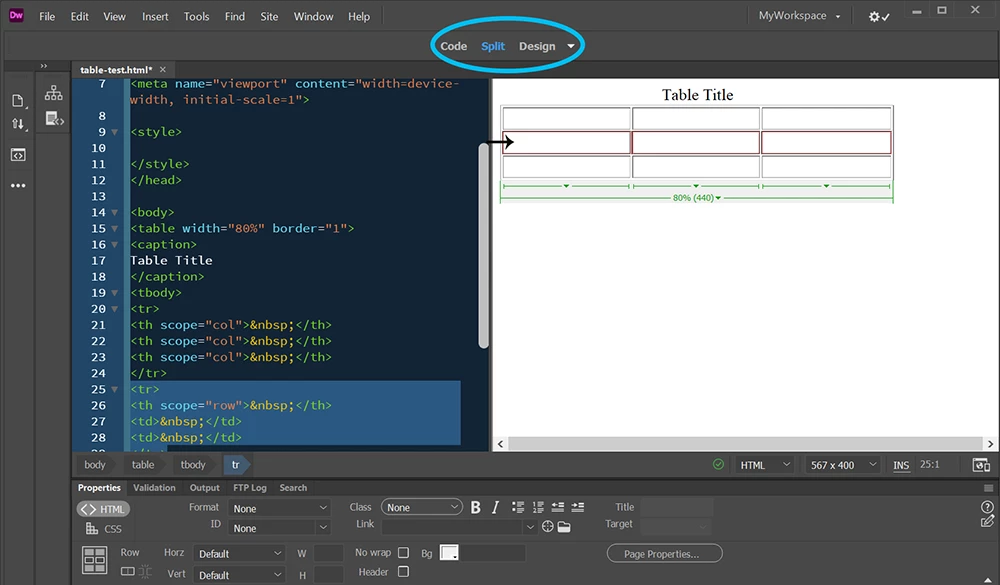
In simplest terms, highlighting a table row in Design view is a simple matter of mousing over the row until you see a small black arrow and red border.  The same works with columns.


2 replies

Nancy OShea
Community Expert
Nancy OSheaCommunity ExpertCorrect answer
Community Expert
April 13, 2021

In my world, manipulating table data dynamically is done with scripts like PHP & SQL, not by clicking & dragging in Dreamweaver.  Tables are rarely used in layouts because they're not responsive in smaller devices.  Perhaps if you show us an example of what you're trying to do, we can provide better assistance.


In simplest terms, highlighting a table row in Design view is a simple matter of mousing over the row until you see a small black arrow and red border.  The same works with columns.


Nancy O'Shea— Product User & Community Expert
FrontsiteAuthor
Participant
April 21, 2021

Thank you! 

The problem was because I´ve selected the option "Dynamic" instead of "Design" in this top center menu.

Now it´s Ok!

Jon Fritz
Community Expert
Community Expert
April 13, 2021

I haven't noticed any change in tables between 2015 and 2021.

Are you sure you are in Design View and not working in DW's Live View Editor?

What are you trying to do, specifically, that you can't?

FrontsiteAuthor
Participant
April 21, 2021

Thank you Jon, and the problem was exactly this.... I was not using the "Design" option into the top center menu, but the other option that was causing a sense of change in the DW interface. But now it´s ok! Thank you.