

Known Participant
May 31, 2017
Question

Help button not working for the Hyperlink menu dialog

  • May 31, 2017
  • 3 replies
  • 1885 views

When I hit "Help" I get the following:
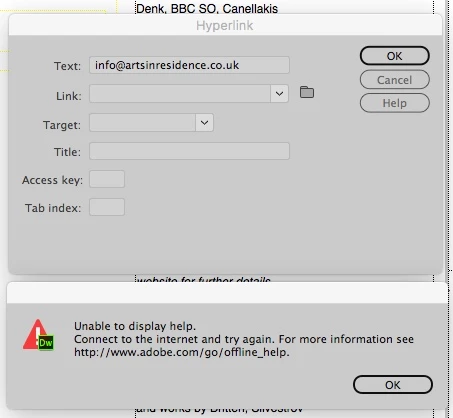
I am connected to the internet, otherwise I wouldn't be here!

    This topic has been closed for replies.

    3 replies

    Niharika Jha
    Adobe Employee
    Adobe Employee
    June 1, 2017

    Hi,

    Can you please tell us if you are manually able to open and see this link in any of your browsers?

    How to link files, documents, or specific elements within or across your web pages in Dreamweaver.

    If you are not, can you please try clearing your browser cache and retry? Also, if this is occurring with Hyperlink Help or no help links in Dreamweaver are working for you? If that is the case we may have to fix your host file.

    We would also like to know if you are working on MAC 10.10.5 and Dw version and build number?

    Regards,

    Niharika Gupta

    Adobe Dreamweaver

    BGBFAuthor
    Known Participant
    June 1, 2017

    The link in your post works OK but, as you will have read in my previous post. it's not relevant. The issue is being unable to access help from Dreamweaver.

    OS is v. 10.12.5

    Dreamweaver is 2017.1 release, 9583 build.

    Hope this helps you to resolve the issue.

    Niharika Jha
    Adobe Employee
    Adobe Employee
    June 1, 2017

    Hi,

    Operating system hosts files map host names to IP addresses. An incorrectly configured hosts file can affect your computer's ability to connect to Adobe's activation servers. We can help you reset the host file with our tool or manually, whatever you prefer-

    Solution 1-

    • Download the Limited Access Repair tool:Limited Access Repair tool for Mac OS
    • Extract the downloaded file, and then run the Limited Access Repair tool in Admin mode.
    • Mac OS: Double-click the tool and enter the admin credentials to continue.

    For more information on how to use the Limited Access tool, see Limited access error in Creative Cloud for desktop app

    Solution 2-

    • To find the hosts file, open Finder and then choose Go > Go to Folder. In the box, type the following location and then press Return:/private/etc/hosts
    • Open the hosts file using a text editor such as Text Edit.
    • Check for any Adobe-related entries in the hosts file.
    • If there are Adobe-related entries in the hosts file, move the file to the desktop, for example by dragging.
    • Delete the Adobe-related entries from the hosts file.Make sure that you do not delete any other entries.
    • Save the hosts file that you edited in the previous step.
    • Move the file from desktop to the original location: /private/etc/hostsWhen moving the file, select the Replace option.The updates hosts file should not have any Adobe-related entries.

    You can find more details on -Resolve connection errors with Adobe Creative Cloud and Creative Suite applications

    Hope this helps.

    Regards,

    Niharika Gupta

    Adobe Dreamweaver

    Nancy OShea
    Community Expert
    Community Expert
    May 31, 2017

    Try this.  See screenshots.

    Nancy

    Nancy O'Shea— Product User & Community Expert
    BenPleysier
    Community Expert
    Community Expert
    May 31, 2017

    There can a number of reasons why the connection to Adobe is disallowed, including

    • the hosts file (Windows/System32/drivers)
    • the firewall
    • anti virus software.
    Wappler is the DMXzone-made Dreamweaver replacement and includes the best of their powerful extensions, as well as much more!
    BGBFAuthor
    Known Participant
    May 31, 2017

    Nothing to do with Windows. Using Mac OS10.

    Preran
    Legend
    May 31, 2017

    I tested on my Mac OS, and the link works just fine. It took me a few seconds but the page opened. Here's the link to the page How to link files, documents, or specific elements within or across your web pages in Dreamweaver. See the section Add a link using the Hyperlink command

    Like Ben said, it could be an issue with a setting on your computer. or a firewall blocking access.

    Thanks,

    Preran