Marcossobreiro
Participant
October 30, 2018
Answered

HELP! Purple line cannot be found.

  • October 30, 2018
  • 5 replies
  • 1352 views

Hi everyone.

(DISCLAIMER: I am a total beginner to this program and to coding in general)

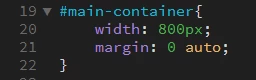
I am preparing for an exam and I have run into a problem. I was following a video from a teacher building a website, and at a certain point, he used a purple line that I cannot do myself. I believe it says      # main-container. However when I try it myself, I get a blue line instead.
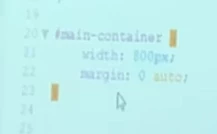
Due to this, I am not being able to center my items.

Can someone please help me? I am probably doing something very stupid

This topic has been closed for replies.
Correct answer Nancy OShea

The only thing the code in your screenshot does is center the #main-container div.  No lines or borders are defined there,  purple or otherwise.

Purples and blues are adjacent to each other on color charts.  If you're using an un-calibrated monitor with a bad color profile, the rgb or hex color codes for purple might seem more like blue on your screen.

5 replies

John Waller
Community Expert
Community Expert
October 30, 2018

Due to this, I am not being able to center my items.

As the others have pointed out, you're being confused by the teacher's line of text being purple and yours being blue. That's purely cosmetic. Just the color scheme of your code editor. Has no effect on your web page.

It certainly has nothing to do with why your code is not centering your items. We'd need to see your entire page (HTML and CSS) to tell you what's wrong there.

Nancy OShea
Community Expert
Nancy OSheaCommunity ExpertCorrect answer
Community Expert
October 30, 2018

The only thing the code in your screenshot does is center the #main-container div.  No lines or borders are defined there,  purple or otherwise.

Purples and blues are adjacent to each other on color charts.  If you're using an un-calibrated monitor with a bad color profile, the rgb or hex color codes for purple might seem more like blue on your screen.

Nancy O'Shea— Product User & Community Expert
Jon Fritz
Community Expert
Community Expert
October 30, 2018

If you are talking about the line of code being blue instead of purple (on a dark background instead of light), you could switch to the Light code theme in DW's preferences to get your code view to look more like the video. However that coloration really doesn't mean anything in and of itself, other than showing you where a property is when compared to its value.

That's changed under Edit > Preferences > Interface > App Theme (choose the lightest color chip)

pziecina
Legend
October 30, 2018

Could it also be that, 'the purple line' you are refering to, is the background color of the line in code view?

If so, then the purple color is nothing more than an indicator of the css/html line that is currently selected.

Legend
October 30, 2018

pziecina  wrote

Could it also be that, 'the purple line' you are refering to, is the background color of the line in code view?

If so, then the purple color is nothing more than an indicator of the css/html line that is currently selected.

I think looking at it now the OP just means the tutors #main_container selector wording is in purple whilst theirs is in blue - just a different editor color scheme.........nothing to do with the code and how it affects the page.

Jon Fritz
Community Expert
Community Expert
October 30, 2018

There is nothing in that code that would create a purple line.

Without seeing the remainder of the code, and the tutorial being used, it's going to be pretty difficult to come up with any reasoning for not seeing what happens in the video on your version of the page.

Marcossobreiro
Participant
October 30, 2018

Hi Jon, do you perhaps know why the teacher's line appears purple instead of blue?

Legend
October 30, 2018

Marcossobreiro  wrote

Hi Jon, do you perhaps know why the teacher's line appears purple instead of blue?

We cant see the code which creates this phantom purple line we cant even see the code which creates your blue line, can you provide a bit more information?

Have you got the right color code, you would need to declare a number (see example below) to create a color - IS your number the same as used by your tutor.

Example:

#123456;