Participant
April 13, 2017
Answered

Help - Updated to 2017 CC and setting changed

  • April 13, 2017
  • 1 reply
  • 248 views

I've tried searching the web for a fix for this, but honestly have no idea the terms that would get me this answer.

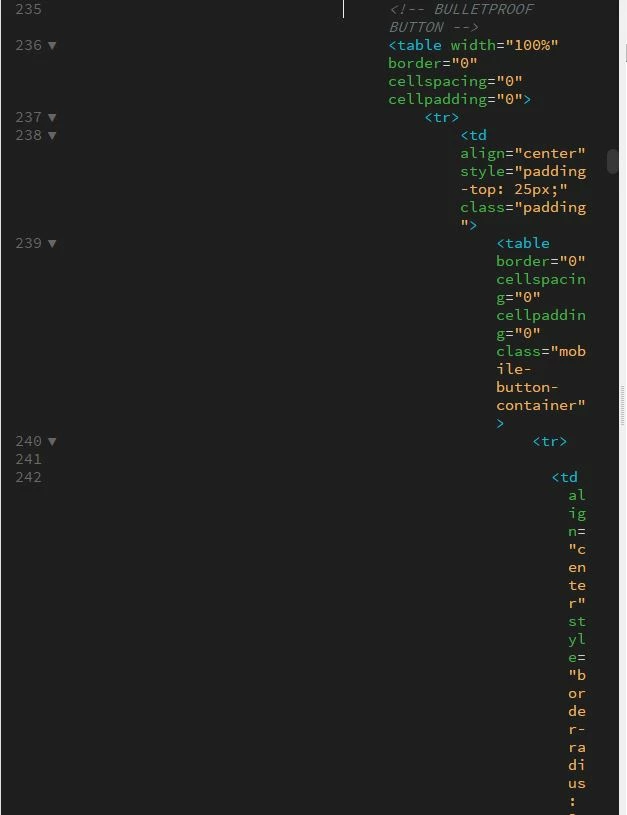
I updated to Dreamweaver CC 2017 and code that used to be indented and wrap to the second line in split mode now does not wrap to line 2 and begin on the left of the window, it aligns to the parent tag, so in my responsive email with nested tables I'm getting pieces that are literally 2 characters wide going down the right of my split screen.

How do I re-calibrate my settings so that the code, even though it's indented on the parent tag, will flow to the beginning (far left) of the line when the line wraps? I don't want to turn off line wrapping and have to scroll to my code either. There must be a setting to turn off/toggle. This is on PC if that helps.

    This topic has been closed for replies.
    Correct answer Jon Fritz

    Unfortunately it appears that that's the way text-wrap works in DW's code engine (Brackets) now.

    I didn't realize it because I don't use tables for anything but HTML email and haven't done one since CC2017 came out. CC2017 appears to recognize the tab indentation of the parent element and give the same indent to code that would otherwise require a line break, so the same code will be shorter vertically in CC2015 with the same wrap and tab settings...

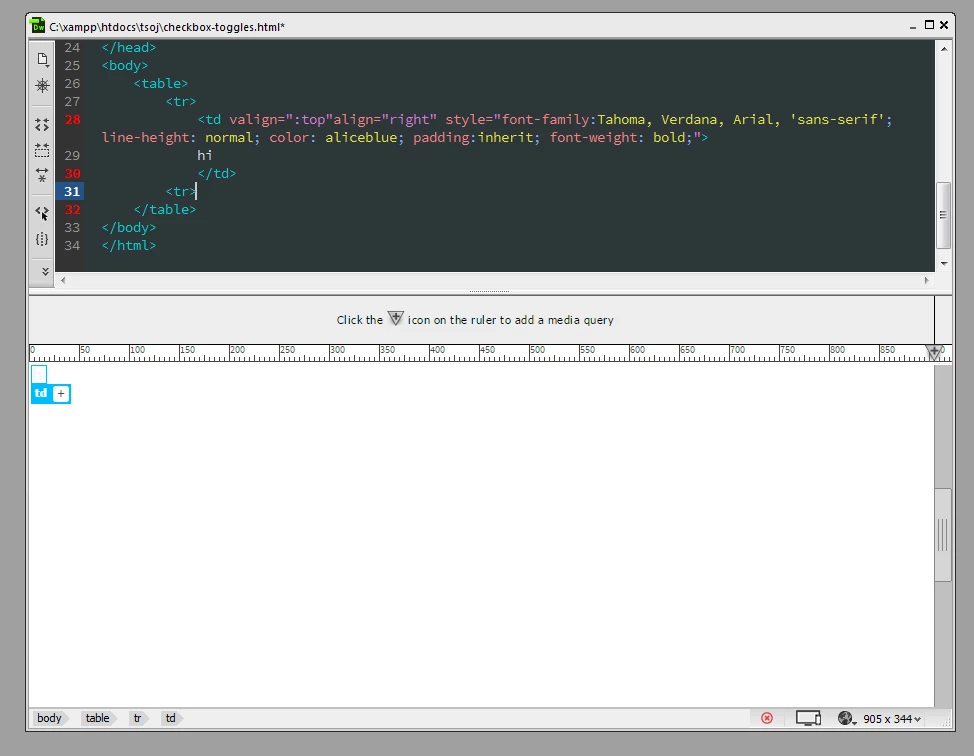
    CC2015:

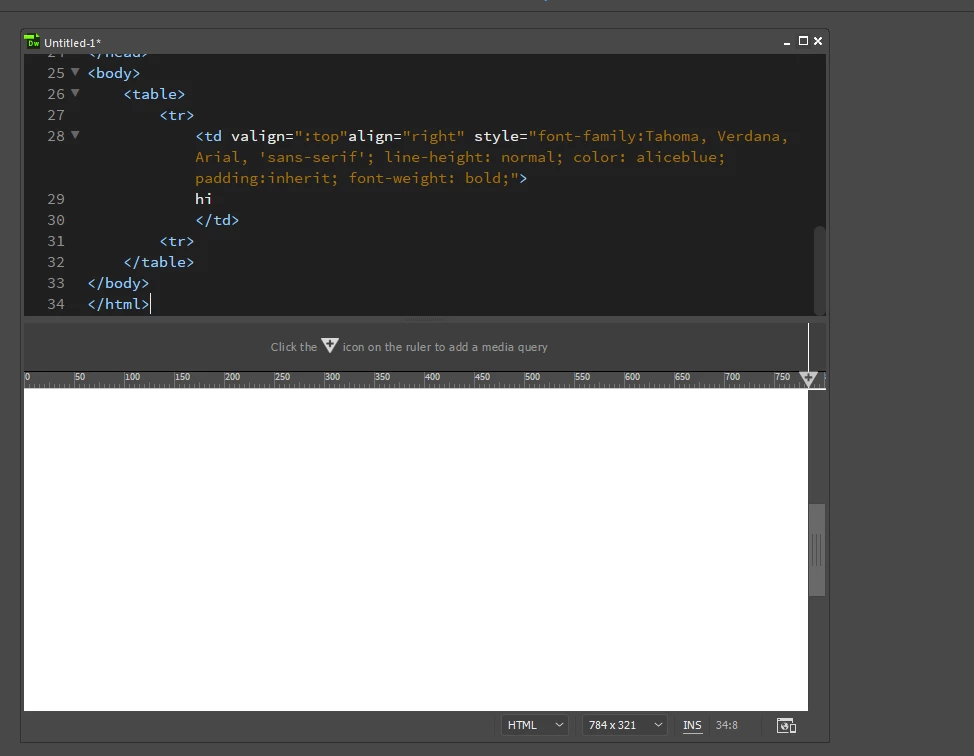
    CC2017:


    You can use Help > Submit Bug/Feature Request from within DW to report it, or add your voice to another report if one is there. It would be nice to get the old behavior back, especially for HTML emails.

    1 reply

    Jon Fritz
    Community Expert
    Community Expert
    April 13, 2017

    I'm guessing it starts correctly at the top of your html, but you likely have a large number of nested elements that have their indents set in your Tag Libraries and the Word-Wrap is turned off in your Common Toolbar.

    The toolbar you're looking for is the vertically oriented Common toolbar (Window > Toolbars > Common)
    Once open, click the 3 dot icon on the bottom of it (Word-Wrap isn't available by default)
    Scroll down to Word Wrap and give it a checkmark to add it to the toolbar

    Back in the toolbar itself, click the new Word Wrap icon to activate it and the code should look more like the older version of the program

    If your indent settings aren't supposed to do what they're doing, you can try Edit > Code > Apply Source Formatting

    Chances are it won't change anything though. You'll likely need to go into Tools > Tag Libraries and change the indentation settings for the tags you use the most. Once changed, you'll need to go to every page and Apply Source Formatting to change them.

    Participant
    April 13, 2017

    I actually had that feature enabled already, so nothing changed.

    Applying Source Formatting made the indents shorter, so it did pull it in tighter, but that doesn't really fix my issue. I'm hoping that once it runs out of space on the right and word wraps to the next line, that line starts on the far left of the window, instead of tabbed underneath the element (td, table, etc).

    Something like this: (red arrows)

    It might be worth noting that I was updating from CC 2014 or CC 2015, so if this has been this way for a few versions, I just wasn't aware of the change before updating.

    Jon Fritz
    Community Expert
    Jon FritzCommunity ExpertCorrect answer
    Community Expert
    April 13, 2017

    Unfortunately it appears that that's the way text-wrap works in DW's code engine (Brackets) now.

    I didn't realize it because I don't use tables for anything but HTML email and haven't done one since CC2017 came out. CC2017 appears to recognize the tab indentation of the parent element and give the same indent to code that would otherwise require a line break, so the same code will be shorter vertically in CC2015 with the same wrap and tab settings...

    CC2015:

    CC2017:


    You can use Help > Submit Bug/Feature Request from within DW to report it, or add your voice to another report if one is there. It would be nice to get the old behavior back, especially for HTML emails.