


Participant
February 17, 2023
Question

Help with coding for Dropcap

  • February 17, 2023
  • 3 replies
  • 521 views

I need help with a problem I an having with using coding for dropcap that was coded several years ago. I am not familiar enough with coding, I just use the stylesheet that provided. The person who developed the stylesheet is no longer available.


Here is the coding:

/*==DROP CAPS==*/
span.dropcap {
font-size: 300%;
font-weight: bold;
height: 1em;
float: left;
margin: 0.3em 0.125em -0.4em 0.1em;
color: #999999;


Here is what it looks like on an Amazon Fire Tablet 10".
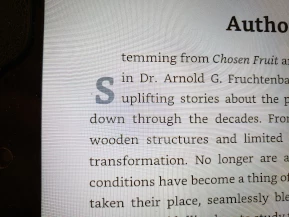
Any suggestions?

Thanks in advance for the help.

Becky

This topic has been closed for replies.

3 replies

Nancy OShea
Community Expert
Community Expert
February 17, 2023

The CSS3 way to do this is with a ::first-letter pseudo-class


PROS:

1. No extra markup required which is cleaner than <span> tags and classes.  

2. Well-supported by browsers (99%). https://caniuse.com/?search=%3A%3Afirst-letter


HTML:

<p>It was the the best of times, it was the worst of times, it was the age of wisdom, it was the age of foolishness, it was the epoch of belief, it was the epoch of incredulity, it was the season of light...</p>


CSS:

p:first-child:first-letter {
  color: #903;
  float: left;
  font-family: Georgia;
  font-size: 75px;
  line-height: 60px;
  padding-top: 4px;
  padding-right: 8px;
  padding-left: 3px;
}

Adjust values as needed.


Nancy O'Shea— Product User & Community Expert
Community Expert
February 17, 2023

For this type of problem we really need to see the entire code of the page. Preferrably live. This is because while that CSS may impact the drop cap, it may not be the only thing that is impacting it. My gut seems that the margin or padding at the top is too much and pushing it down too far. But its hard to tell if the code you posted along is causing this.

Jon Fritz
Community Expert
Community Expert
February 17, 2023

I suppose it probably depends on the font being used, but with the default serif browser font, changing the margin setting to...

margin: -.1em 0.125em .1em 1em;

...makes it look a lot more like it should.

Participant
February 17, 2023

Thank you! I will try it.

[Moderator Note: Personal information removed. Be careful when replying by email, it's best to remove your signature before sending.]