
TigerMO
Inspiring
March 14, 2022
Question

help with inconsistent region names

  • March 14, 2022
  • 4 replies
  • 2139 views

I have made some changes to the template that I use on all pages of my web site, but now as I try to apply the new version of the template to existing pages to update them with the changes, I get this error:
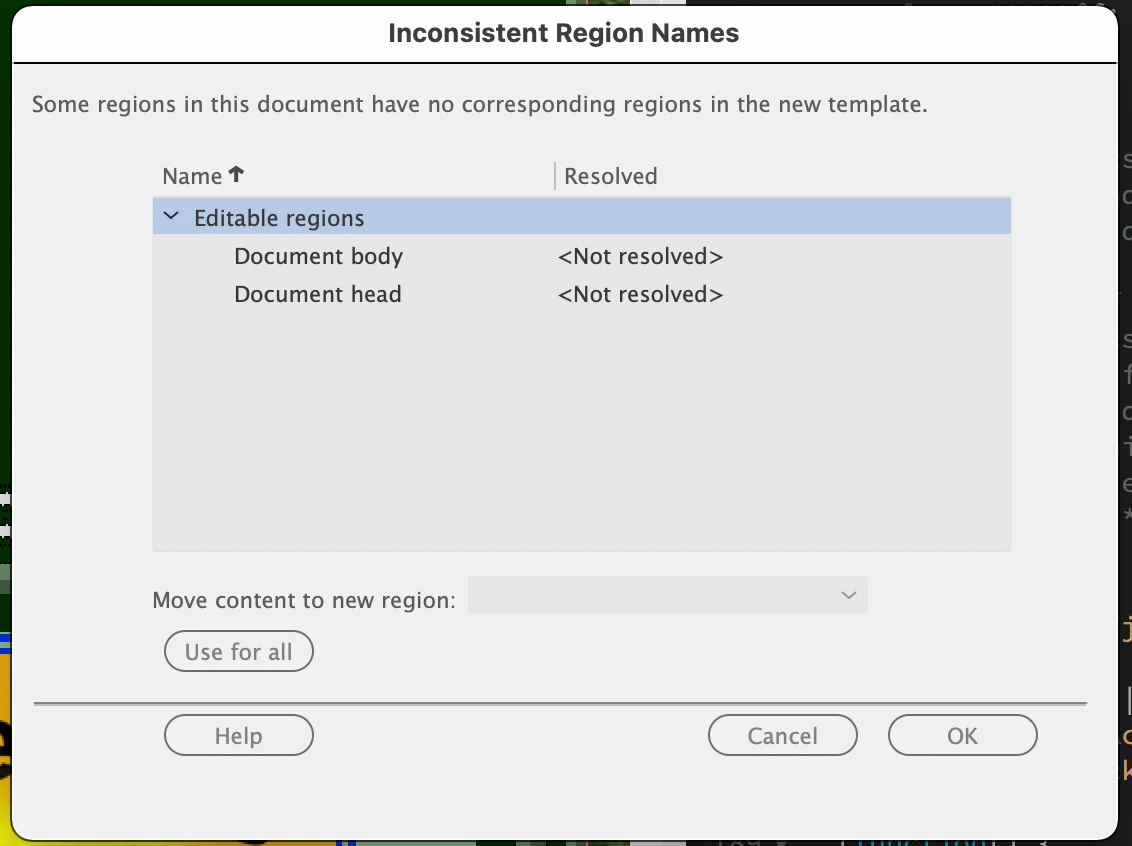
I have no idea how to begin to resolve this because I don't understand what it's telling me. There are some options to choose from in the dropdown "Move content to new region," but I don't know what those mean. I've made earlier changes to the template and when I saved it, I would choose to update the pages, but I've never gotten this error before.


I'm a real novice in using Dreamweaver, so please give me step-by-step instructions on how to proceed. Thanks.

This topic has been closed for replies.

4 replies

B i r n o u
Legend
March 24, 2022

youps, coming back to the studio, I see the last exchanges of this thread, and I didn't imagine that by slipping this question to Lena, it would generate such a controversy.


However, thanks to the members of this community for intervening to avoid any abuse, and in that sense, I just discussed it with Lena, and in fact neither she nor I felt abused. In any case, the vigilance of all is appreciable.


Concretely, it took Lena about 15 minutes to work out the problem... she had that much time, at that moment, and enjoyed trying to help Motiger, who moreover acts as a volunteer in an association...


may the day be beautiful and pleasant for all

Community Expert
March 24, 2022
quote

I have made some changes to the template that I use on all pages of my web site, but now as I try to apply the new version of the template to existing pages to update them with the changes, I get this error:

By @TigerMO


The only supposed to be a child page that Birnou gave me is the one called members_only_index.html, but this page is not issue from a template.


Could you please send me at least two or three pages that are child pages ?

TigerMO
TigerMOAuthor
Inspiring
March 24, 2022

I'm sorry. I didn't mean to send the more recent message about still getting an error. I didn't know that you could drag a template from the assets panel onto a page to apply the template. I've been doing that with each child page and that works perfectly.


Thank you and Birnou for your time addressing my question. I didn't expect my question to be so controversial.

Community Expert
March 24, 2022

No need to worry! I'm glad this was able to help you!

Nancy OShea
Community Expert
Community Expert
March 14, 2022

When you say you made changes to Template, is it a proprietary .dwt file? 


Are templates saved as .dwt file to your site's Templates folder?  This is critical for Templates to work.


Do all child pages have the same Editable Region names as your Template?  This is also critical.


I have seen problems occur when people try to nest one Template inside another Template.  For many reasons, this practice should be avoided.  Nested templates only make your life more complicated. 


For better answers, we need to see the code from your Template and the child page you're trying to populate.  The best way to do that is with a URL to your online site.


Nancy O'Shea— Product User & Community Expert
TigerMO
TigerMOAuthor
Inspiring
March 21, 2022

@Nancy OShea wrote:

When you say you made changes to Template, is it a proprietary .dwt file? 

The templates all have the .dwt file extension. 

Are templates saved as .dwt file to your site's Templates folder?  This is critical for Templates to work.

Yes.

Do all child pages have the same Editable Region names as your Template?  This is also critical.

I don't understand Editable Regions or how they are created, so I can't answer that.

For better answers, we need to see the code from your Template and the child page you're trying to populate.  The best way to do that is with a URL to your online site.

I've provided the URLs for two files: the template and I guess what you called a child page. The child page used a previous version of the template prior to recent revisions that created the problem. Now I can't apply the template to this page (or any others).


https://boonerta.org/members_only_index.html

https://boonerta.org/GOOD%20basic_template.dwt

Thanks for your help.


B i r n o u
Legend
March 21, 2022

Following my previous comment, now we can see the structure and construction of your model


However, in order to best help you with the dialog you get when updating a new child, I will need to know what change you made to the DWT.


For information, when you open the DWT sent...
you have on line 16, 17 and 18 the following code

<!-- TemplateBeginEditable name="doctitle" -->
<title>Boone County Unit &#8212; MRTA</title>
<!-- TemplateEndEditable -->

this mean that each child page from this template will be able to change the title of the page

from line 267 to 280, all code in beween the comment will not belong to the DWT but to the child page... and so can be completly editable, removable, whatever you want

<!-- TemplateBeginEditable name="ContentArea" -->
<div id="mainContent">
  <p align="center">Insert</p>
  <p align="center">&nbsp;</p>
  <p align="center">&nbsp;</p>
  <p align="center">&nbsp;</p>
  <p align="center">content</p>
  <p align="center">&nbsp;</p>
  <p align="center">&nbsp;</p>
  <p align="center">&nbsp;</p>
  <p align="center">&nbsp;</p>
  <p align="center">here</p>
</div>
<!-- TemplateEndEditable -->

the comment are displayed by the starting and ending comment signs <!-- and -->

<!--   HERE IS AN HTML COMMENT   -->


In the last comment, you can see that it is a TemplateBeginEditable, and that the name is ContentArea

That do mean that it is an editable region which has the name  ContentArea


and that's it... you just have an Editable Title and a unique editable region for each child page from that template


question.... what did you change to this DWT template to get the dialog box that you posted in our very first comment.

Knowing that we could help you more... but already, I would say document body to BODY and document head to HEAD... try the drop-down menus and see what they propose


B i r n o u
Legend
March 14, 2022

without seeing exactly what you did, as a modification, it's hard to say... but it's not an error dialog, it's a normal and useful dialog that appears when we made an heavy change to the template, it allows us to be able to redirect the content as it should, when an ambiguity occurs...
Normally from the information required, I would say BODY should go to BODY, and HEAD to HEAD... but again, we would need to know the changes you made... in fact, know the DWT before and the DWT after.