

Participating Frequently
March 5, 2017
Question

Hiding "invisible" files

  • March 5, 2017
  • 1 reply
  • 467 views

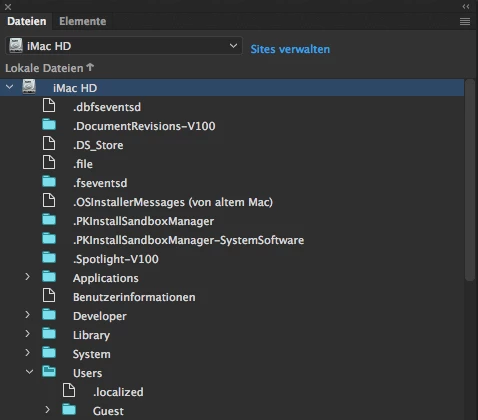
Is it possible to hide local files starting with a dot (=invisible files on a Mac, e. g. ".DS_Store") from the "Files" panel ("Window"/"Files")?

This topic has been closed for replies.

1 reply

Nancy OShea
Community Expert
Community Expert
March 5, 2017

It might make things a lot easier if you define a local site folder for each project.   That way you're not looking at contents on your entire hard  drive.

Nancy

Nancy O'Shea— Product User & Community Expert
Tomer1cAuthor
Participating Frequently
March 5, 2017

Hi Nancy,

I don't use DW for large(r) projects, but usually only for single files. Therefore, in my case, it's often not worth defining a "Site"...

Nancy OShea
Community Expert
Community Expert
March 5, 2017

It's absolutely worth it to define a folder for your projects.  You can create one common folder called Empty_Site for example and use that whenever you need to edit something.   That's the way DW is designed to work.

Nancy O'Shea— Product User & Community Expert