Christacticc
Participant
February 28, 2020
Answered

History functionality in code too invasive

  • February 28, 2020
  • 1 reply
  • 1447 views

Hello,
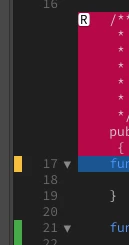
In the code display, there are orange / green / red margins on the left which display the deleted code in a red block with an R to restore this deleted code.
Where are these functions explained?
I find this very annoying because I prefer to be able to simply select lines by clicking and dragging on the line numbers.
How can we deactivate this history reminder function?

Thanks!

This topic has been closed for replies.
Correct answer pziecina

The colored bars are there because you are using git as a version control system.

They show which sections of code have been deleted, changed and included, when the file(s) are compared with older/newer vesrsion from the git repository.


The color coding is almost standard for such use, (MS Word, Project, etc) and many version control systems do the same. I don't use git, but maybe another participant can tell you how to just use git as a 'back-up' sytem, (which is the only reason left to use git, without version control).

1 reply

pziecina
pziecinaCorrect answer
Legend
February 28, 2020

The colored bars are there because you are using git as a version control system.

They show which sections of code have been deleted, changed and included, when the file(s) are compared with older/newer vesrsion from the git repository.


The color coding is almost standard for such use, (MS Word, Project, etc) and many version control systems do the same. I don't use git, but maybe another participant can tell you how to just use git as a 'back-up' sytem, (which is the only reason left to use git, without version control).

Christacticc
Participant
February 28, 2020

Thank you very much !