


Hitting 'enter' in the code panel does keep straight lines
I am trying to move over to CC2018 from 2016 and must note how big a learning curve it is.
One of the issues bothering me is when i am writing code (split screen - code on the left, design on the right) and i hit <enter> to get to a new line.
My pages are mixed HTML/Classic ASP and are usually defined as 'VBScript' in the language drop down at the bottom of the screen - mainly because the default 'HTML' mode does a bad job of trying to understand the ASP code. The 'VBScript' option is only slightly better from that perspective....
If I am using Word Wrap, which i usually like to, the lines sometimes go completely wonky.
Often, when i try deleting from the behind existing text, to try get it upwards to the end of the previous line - nothing happens, no matter how many deletes i do. Also, trying to 'tab' lines, to get them into a nice structure, does not work when in Word Wrap mode. Neither does CTRL + SHIFT + >
Here are some samples.
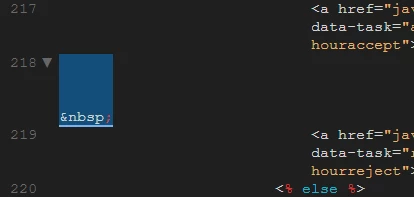
Sample : Why do some of the lines become so high.. See line 218 which only has a ' ' in it
When i de-activate Word Wrap (which can be very annoying to use, as the lines just disappear 'below' the design panel), i have somewhat better results when i hit enter. The new line is created properly - but more often then not, the cursor does not return to the same location as the line above it, as i always had in CC2016. Very annoying as the code becomes untidy.
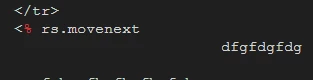
Sample: hitting <enter> after the 'movenext' and then starting to type, DW sent me all the way over to where the 'dfg... ' is now. Same happens with the following lines.
Thanks for your attention.



 AdChoices