Hosun
Inspiring
June 8, 2019
Answered

hover

  • June 8, 2019
  • 2 replies
  • 617 views

Hi,

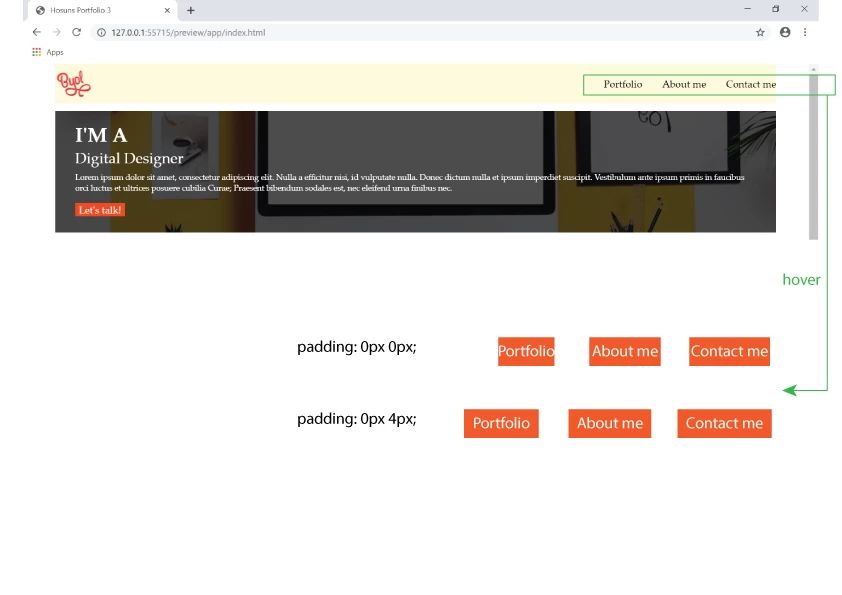
When I give "padding" upon hover to make a orange box wider, all the lists shift to the left.

How can I fix it?

Hosuns Portfolio 3

Hosun Kang

This topic has been closed for replies.
Correct answer osgood_

Its not considered good practice to change the dimensions of links button on hover as the layout will look odd as you have discovered. A better practice is to change the links background color or add a bottom border to the link.

If you add a dimension on hover to a link then normally you would factor the same dimension into the default link to compensate for the change in appearance on hover.

2 replies

osgood_Correct answer
Legend
June 8, 2019

Its not considered good practice to change the dimensions of links button on hover as the layout will look odd as you have discovered. A better practice is to change the links background color or add a bottom border to the link.

If you add a dimension on hover to a link then normally you would factor the same dimension into the default link to compensate for the change in appearance on hover.

B i r n o u
Legend
June 9, 2019

not always, in an accesibility approach it can be very usefull and helfull

https://www.tutorialrepublic.com/faq/how-to-transform-image-size-on-mouse-hover-without-affecting-the-layout-in-css.php

but Paula said it first...

Legend
June 9, 2019

https://forums.adobe.com/people/B+i+r+n+o+u  wrote

not always, in an accesibility approach it can be very usefull and helfull

https://www.tutorialrepublic.com/faq/how-to-transform-image-size-on-mouse-hover-without-af fecting-the-layout-in-css.php

but Paula said it first...

Let me clarify. I personally don't think it's that good approach to alter the dimensions of navigation links IF it creates some unwanted situations in a page layout as in this case it clearly did, otherwise the OP would not have posted. A sudden unexpected change in layout, which the default hover would deliver,  is never good for an end user but yes if you want to zoom, and I disagree where links are concerned, at least do it a bit more smoothly using css transitions, so the user is not so 'shocked' at the change.

You need to make subjective decisions where best to deploy effects, obviously this is going to be different depending on your tastes. Some just deploy effect all over the place because its possible, usually not a nice result.

If a naviagtion button is zoomed, without displacing the navigation buttons around it, although a bit twee in my opinion, it would be more accepatable rather than other elements jumping eratically around in recaction to a specific element being effected, but its being sensible and executing the result subtely that counts.

pziecina
Legend
June 8, 2019

If you want something to enlarge, (or shrink) on hover you dont change the padding or other css. Instead you use css transform, (scale) see -

https://developer.mozilla.org/en-US/docs/Web/CSS/transform