Hosun
Inspiring
July 17, 2019
Answered

hover [How to control the extent of hover highlighting?]

  • July 17, 2019
  • 1 reply
  • 314 views

Hi,

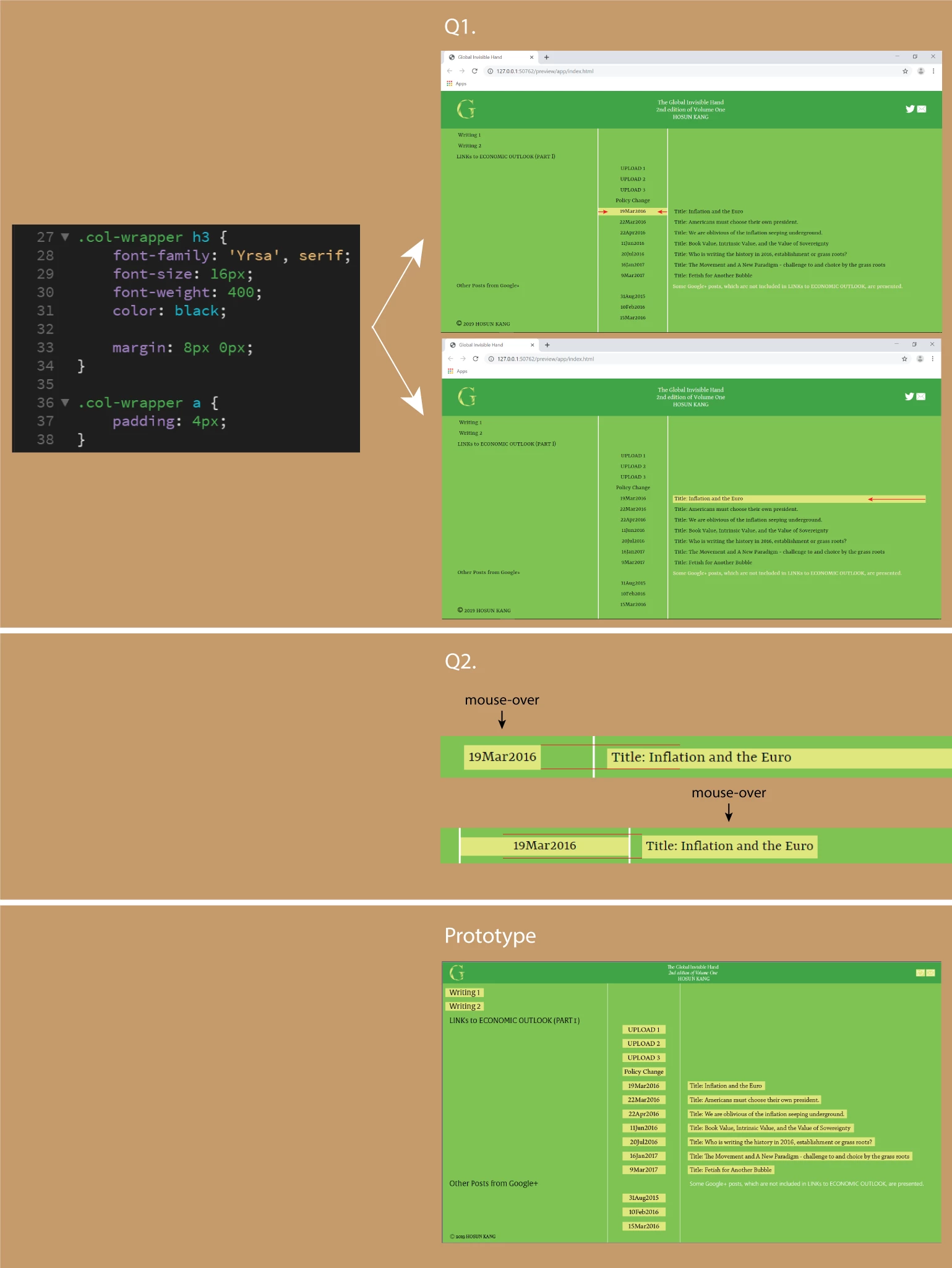
Q1.

Upon hover, the yellow rectangle becomes too wide.

How can I narrow it?

Q2.

Upon hover, the heights of the yellow rectangles become different.

How can I make them identical?

Global Invisible Hand

Hosun Kang

This topic has been closed for replies.
Correct answer BenPleysier

The colour change is aimed at the 'h3' selector. The 'h3' element is a block level element that occupies the full width of the container. An 'a' element is an inline level element which occupies the space that is required for the content. It would be bettr to select the 'a' elemnt as the selector.

1 reply

BenPleysier
Community Expert
BenPleysierCommunity ExpertCorrect answer
Community Expert
July 17, 2019

The colour change is aimed at the 'h3' selector. The 'h3' element is a block level element that occupies the full width of the container. An 'a' element is an inline level element which occupies the space that is required for the content. It would be bettr to select the 'a' elemnt as the selector.

Wappler is the DMXzone-made Dreamweaver replacement and includes the best of their powerful extensions, as well as much more!