kim4fsu
Participating Frequently
June 10, 2018
Answered

How Can I Get Live Code and Real Time Preview to Start Working Correctly?

  • June 10, 2018
  • 1 reply
  • 584 views

I have made several changes to the html and css in DW live code and tried the real time preview but neither has updated the site correctly with the new changes. I have tried disabling caching in Google Chrome and clearing all of the cache in Google Chrome. I have tried to reset the preferences in DWCC2018 but I tried holding the shift and control button at the same time while I double clicked Dreamweaver.exe but all that does in open up Dreamweaver.

This topic has been closed for replies.
Correct answer Nancy OShea

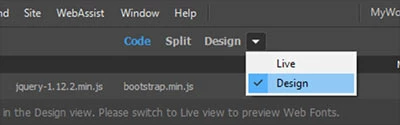
From Document Toolbar, switch to Live View *not the same as Live Code*.

Open your HTML document.  Make changes.  Ctrl+S to Save.

Hit F5 to refresh your page.

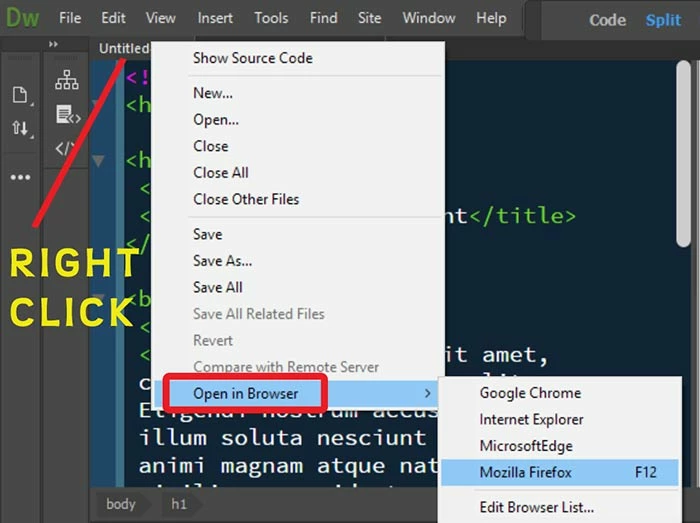
To Preview in browser, right click on document tab and select Open in Browser.

Keep your browser open.  Hit F5 to Refresh after making changes.

1 reply

Nancy OShea
Community Expert
Community Expert
June 10, 2018

Turn off Live Code.  You don't need it to edit HTML & CSS.  I use it rarely to check that my PHP scripts are parsing correctly.  And then I turn it off.

Are you working in a defined local site folder?

Nancy O'Shea— Product User & Community Expert
kim4fsu
kim4fsuAuthor
Participating Frequently
June 10, 2018

When I am editing CSS and HTML, I would like to see the changes show immediately so that I can make sure that I am coding my site correctly. How can I do that without live code and real time preview not working?

I am working in a local site folder.

Nancy OShea
Community Expert
Nancy OSheaCommunity ExpertCorrect answer
Community Expert
June 10, 2018

From Document Toolbar, switch to Live View *not the same as Live Code*.

Open your HTML document.  Make changes.  Ctrl+S to Save.

Hit F5 to refresh your page.

To Preview in browser, right click on document tab and select Open in Browser.

Keep your browser open.  Hit F5 to Refresh after making changes.

Nancy O'Shea— Product User & Community Expert