Hoodoo12
Inspiring
May 22, 2017
Answered

how can I revert back to an older version of DW?

  • May 22, 2017
  • 1 reply
  • 680 views

Hi

I recently upgraded to the latest version of DW and I find it completely frustrating to use.

I want to use DW 2014, which was working fine in all aspects for me.  How can get get rid of 2017

and revert back to this useable version?

thanks

This topic has been closed for replies.
Correct answer Nancy OShea

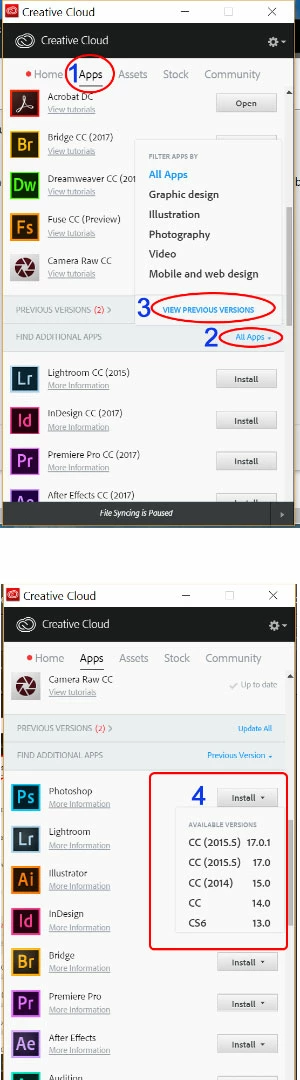
See screenshot.  Click on FIND ADDITIONAL APPS >

1 reply

Jon Fritz
Community Expert
Community Expert
May 22, 2017
Hoodoo12
Hoodoo12Author
Inspiring
May 22, 2017

sorry, but that does not work.  I go to PREVIOUS VERSIONS  > ALL APPS > MOBILE & WEB DESIGN ... and the only thing listed is "Experience Design", which I don't have a clue about and don't want. 

Any other comments on how I can go back to DREAMWEAVER CC 2014? 

thanks for any attempts to solve this riddle.

Jon Fritz
Community Expert
Community Expert
May 22, 2017

You went to the wrong Previous Versions, there are 2 locations with the same name. The one you went to is for "Already Installed Previous Versions..

Click Apps

Scroll Down to the FIND ADDITIONAL APPS bar

Click the blue link inside the FIND ADDITIONAL APPS bar and choose VIEW PREVIOUS VERSIONS (it's the bottom most, blue link in the pop up menu)

That will populate the FIND ADDITIONAL APPS bar with Install icons that act as dropdown menus
Choose DW's and pick one of the now 7 available versions (though CC2017.0, .0.1 and .1 will overwrite each other)

You can actually have 5 versions installed, (CS6, CC, CC2014, CC2015 and one version of CC2017) they just won't run at the same time.