GingaKid
Participant
January 9, 2020
Answered

How Can I Share Edits With Client Across Country?

  • January 9, 2020
  • 1 reply
  • 946 views

[Edited by moderator to restore default text size.]


Hello all!

I'm in need of some help and I just can't figure out what I need to search to get my answer...so...I'm coming to you all ready to learn. I have just started Web Design as a Graphic Designer and I got my first job. Even though it might just be my dad's business website I've been putting in a lot of time updating new Technical Manuals from the state. Anyone who has hired a creative likes updates from them. That is my huge issue right now. The current process of sharing the updates that I have done I have to "save as" the .php doc with a new name, and re-put it on the website so he can then look at it on his computer.


TL;DR: I need to share DW updates with client 1500 miles away and don't know the best way to do it.


Thank you for the help!
This topic has been closed for replies.
Correct answer Nancy OShea

This is literally the first coded website I've had to deal with, besides the sites I created in my Web 1 course that just stayed local and never published. So I'm trying to drink from a firehose right now with tutorials while I edit locally until I can find out my best option. I have a lot to learn and I don't really know what I'm doing besides some basic html and css. I'm trying my best and pushing forward 😄


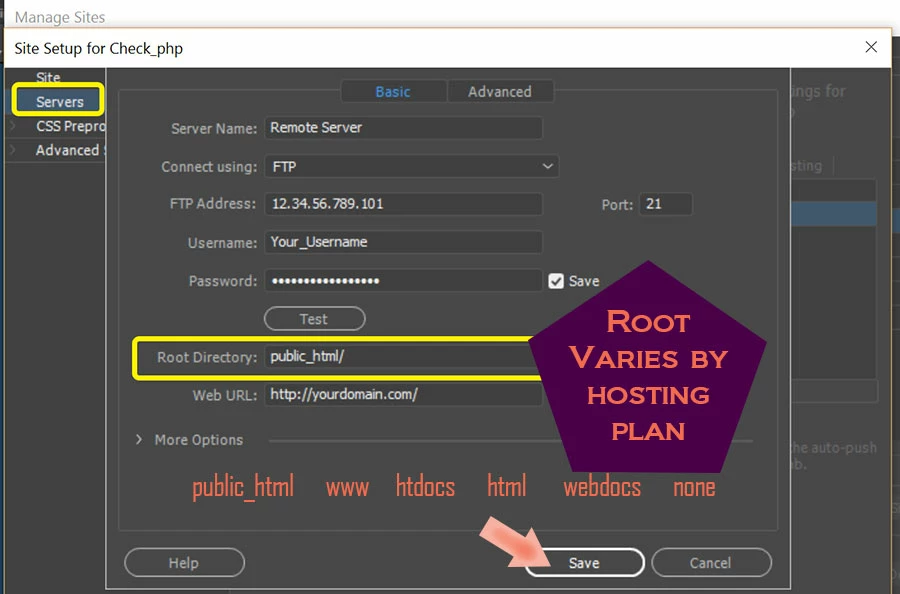
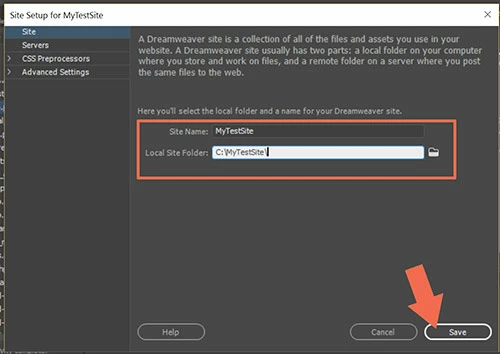
When you get web hosting, the hosting company will send you FTP log-in credentials that you enter in your DW site definition settings.  Site > New Site.


Tell DW where you want your local site folder to reside on your hard disk.  For example, C:\MyTestSite


Click the Servers Tab to enter your FTP log-in details and your server's root  directory.  See screenshot.


Once your server's details are entered, hit the TEST button to confirm you can connect.   If all is working as expected, use the UP arrows in your Files Panel to upload files to remote server. 


1 reply

Nancy OShea
Community Expert
Community Expert
January 9, 2020

I have my own server hosting plan.  I upload client projects to my server and e-mail them the URL so they can review and approve the changes.  Once approved and paid for, I remove files from my server and upload to their server.


Nancy O'Shea— Product User & Community Expert
GingaKid
GingaKidAuthor
Participant
January 9, 2020

Oh wow that seems like a large expense for this project. I know a little bit of coding but none of the back end stuff like that.

Jon Fritz
Community Expert
Community Expert
January 9, 2020

If you don't have a personal website, you can add a folder to your client's site, then upload to that folder first to get the OK to replace actual site content.

You could call it the "dev" folder, for example.

Inside "dev" you create a temporary duplicate of the site or pages you're working on. Your client could then go to "their_domain.com/dev" to preview changes. Once they're OK'd, delete them from the "dev" folder and overwrite the corresponding files on the actual site.