
Participant
November 11, 2016
Answered

How can i switch back from CC 2017 to previous version??

  • November 11, 2016
  • 2 replies
  • 355 views

In my creativecloud version 3.9.1.335 (german, windows 10) isnt dreamweaver in the "previous versions" section. So all notes from adobe how to set back a old version are useless.

So, what else can i do to switch back?

Thanks alot!
    This topic has been closed for replies.
    Correct answer Nancy OShea

    Previous versions are not available to Trial members.

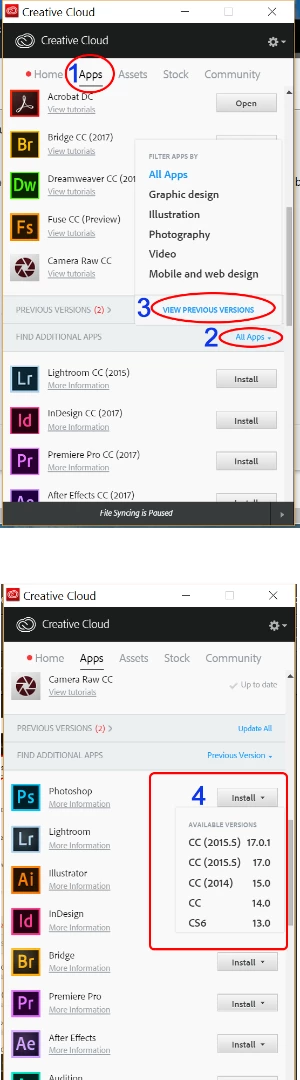
    If you're on a paid plan, see screenshot below.

    Nancy O.

    2 replies

    Jon Fritz
    Community Expert
    Community Expert
    November 11, 2016

    The Previous Versions section only shows the previous versions that are currently installed.

    In order to get to "new" previous versions, you need to...

    1. Scroll down to "Find Additional Apps"

    2. Click the blue link on the right side of the Find Additional Apps bar
    3. Select the bottom option "View Previous Versions" (it will be blue while all other options are black)
    4. This will populate the Find Additional Apps heading with program install icons, click DW's and a drop menu will appear
    5. Choose the version you want and install

    Nancy OShea
    Community Expert
    Nancy OSheaCommunity ExpertCorrect answer
    Community Expert
    November 11, 2016

    Previous versions are not available to Trial members.

    If you're on a paid plan, see screenshot below.

    Nancy O.

    Nancy O'Shea— Product User & Community Expert