Participant
November 28, 2017
Answered

How can I transfer the HTML and CSS files I have already in another program to Dreamweaver?

  • November 28, 2017
  • 1 reply
  • 496 views

I'm trying to transfer some of my code from another html editor I've been using to create a website to Dreamweaver. Is there a way to open them in Dreamweaver and save them as a Dreamweaver file? Will it work if I just open it in Dreamweaver?

This topic has been closed for replies.
Correct answer Nancy OShea

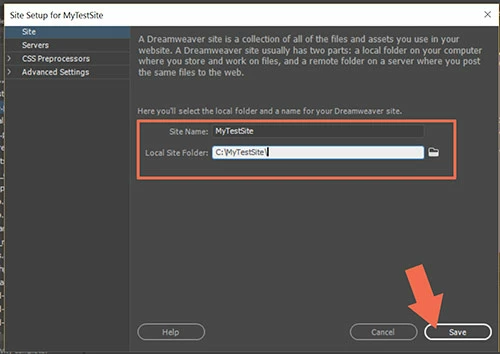
Go to Site > New Site and browse to the folder on your hard drive that contains your site files.

For example, C:\MyTestSite.  See screenshot.

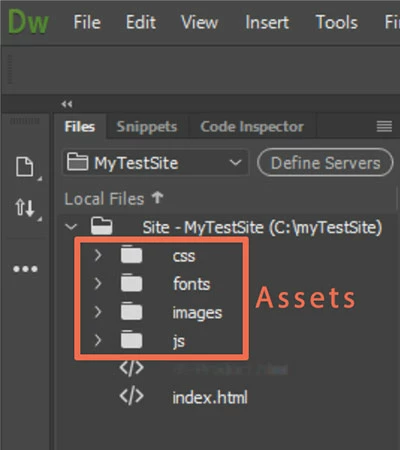
Open your Files panel (F8) and you should see all your files and assets.

Double click on a file -- for example, index.html to open it in your workspace.

1 reply

Nancy OShea
Community Expert
Nancy OSheaCommunity ExpertCorrect answer
Community Expert
November 29, 2017

Go to Site > New Site and browse to the folder on your hard drive that contains your site files.

For example, C:\MyTestSite.  See screenshot.

Open your Files panel (F8) and you should see all your files and assets.

Double click on a file -- for example, index.html to open it in your workspace.

Nancy O'Shea— Product User & Community Expert