
Participant
December 14, 2016
Answered

How do I add "Save" and "Save All" buttons to the Dreamweaver CC 2017 interface?

  • December 14, 2016
  • 3 replies
  • 2169 views

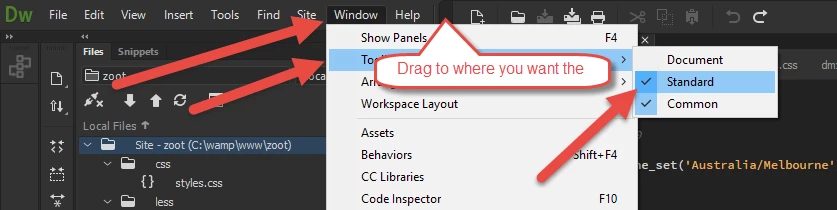
I asked this in a different thread, and got this image in response, which tells me nothing. I tried several things, and none of them worked. I looked in the vertical panel to the left of the interface; while it has an upload ("Put") button, I don't see that it has "Save" or "Save All" buttons.

This is quite frustrating. I don't want to navigate panes to save things, nor do I want to have to hit Ctrl+S. I simply want my little buttons back. (And if I could get little buttons back for "Code," "Live," etc., that would be nice, too.
This topic has been closed for replies.
Correct answer BenPleysier

1. make sure that the desktop is clear

2. open Dreamweaver

3. hit the 'Standard' menu item

4. make the Dreamweaver application smaller (restore button)

5. you should now see the Standard menu-bar.

6. now drag the menu-bar to where you want

7. maximise Dreamweaver

8 adjust the position of the menu-bar

3 replies

Participant
December 19, 2016

I believe that I understand what you are telling me--that I go to "Standard" and the "Save" and "Save All" buttons will appear.

I am saying that they don't appear. I've tried "Standard" by itself. I've tried "Standard" in different combinations with "Document" and "Common." I've tried all of these with and without changes to an open file. No matter what I try, I never see "Save" and "Save All" buttons (nor "Undo," et al.).

Is there something that I'm missing?

BenPleysier
Community Expert
BenPleysierCommunity ExpertCorrect answer
Community Expert
December 19, 2016

1. make sure that the desktop is clear

2. open Dreamweaver

3. hit the 'Standard' menu item

4. make the Dreamweaver application smaller (restore button)

5. you should now see the Standard menu-bar.

6. now drag the menu-bar to where you want

7. maximise Dreamweaver

8 adjust the position of the menu-bar

Wappler is the DMXzone-made Dreamweaver replacement and includes the best of their powerful extensions, as well as much more!
Participant
August 22, 2021

I didn't really appreciate the NDP comment here. I too was looking for an answer to the missing horizontal menu-bar from post CC2019 versions. I used it constantly. I do no like to have to remove my hand from my mouse and use a drop drown menu to to access "new file, folder, save, save as, print, cut, copy, paste, back and forward"! See attached jpg of missing toolbar. I'm using the MAc versions. And please can't we keep this a snark free zone.

Nancy OShea
Community Expert
Community Expert
December 16, 2016

Were you able to resolve the problem with your Toolbars?

Nancy O'Shea— Product User & Community Expert
Participant
December 17, 2016

No. The "Standard" workspace still doesn't have the "Save" and "Save All" buttons, nor do I see any options for them. Regarding the suggestions:

Document Toolbar = Code | Split | Live or Design

*** I know. In the same row with these three options is where I used to have "Save" and "Save All" buttons.

Common Toolbar = the vertical one.

*** Unless there is an option in this toolbar for adding "Save" and "Save All" buttons, I don't understand why you're telling me about it. I can see it. I already looked through it.

Standard Toolbar = Save and Save All buttons are available only when you make changes to files.  Also, you need multiple open files for Save All.

*** I'm not sure what you mean. Do you imagine that I don't know that I must change a file before saving it? That I don't realize there's no point in changing a file which hasn't changed? There are no "Save" and "Save All" buttons on the Standard Toolbar. There are menus I can click through to save files I've changed. But I already knew this. I'm looking for a "Save" button which, when clicked, immediately saves the file I'm currently working on, and a "Save All" button which, when clicked, immediately saves all open files which have been changed.

I simply want a couple of simple buttons, which I had in the previous version of Dreamweaver.

BenPleysier
Community Expert
Community Expert
December 17, 2016

If you follow what Nancy and I have been telling you, then you should have the following result

Wappler is the DMXzone-made Dreamweaver replacement and includes the best of their powerful extensions, as well as much more!
Nancy OShea
Community Expert
Community Expert
December 14, 2016

Document Toolbar = Code | Split | Live or Design

Common Toolbar = the vertical one.

Standard Toolbar = Save and Save All buttons are available only when you make changes to files.  Also, you need multiple open files for Save All.

Please review the new features:

New features summary for the 2017 release of Dreamweaver CC Overview of the Dreamweaver workspace

Nancy

Nancy O'Shea— Product User & Community Expert