



digidandan
Known Participant
November 10, 2017
Answered

How do I change the main data entry highlight color in CC2018?

  • November 10, 2017
  • 1 reply
  • 1502 views

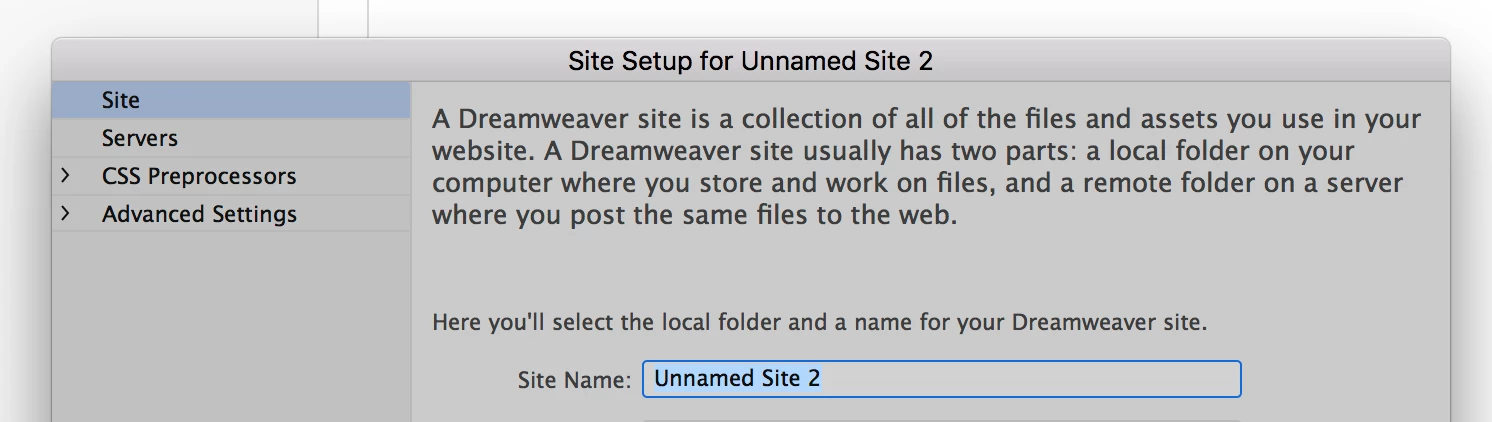
I am using CC2018. I have chosen the color theme "Light". All colors throughout are fine and the way I like them while writing code EXCEPT in one place. When I go to the DW interface itself to set up a new site, for example...SITE >NEW SITE>, the data entry field highlight color is so light that I am having trouble seeing what I am highlighting. Can I change just this one color to a darker color. I know I can customize a theme, but it is way over my head finding what to change and how. I have gotten as far as being able to copy the "Light" theme and make a "new editable" theme from it, but don't know where or what to change to make this one color darker. Any help would be appreciated. I have attached a sample where the "site name" field is highlighted in the default color.

Thanks

This topic has been closed for replies.
Correct answer Jon Fritz

That highlight color is controlled at the OS level.

There might be somewhere in a program file to change the background color of the text field, to off-set the highlight color given by the OS, but I wouldn't know where to start looking.

To change the highlight in Windows7, you need to go into Personalize > Window Color > Advanced Appearance Settings > Item > Selected Items and choose a new color.

I'm not sure where it would be in Mac, or other versions of Windows though.

1 reply

Jon Fritz
Community Expert
Jon FritzCommunity ExpertCorrect answer
Community Expert
November 10, 2017

That highlight color is controlled at the OS level.

There might be somewhere in a program file to change the background color of the text field, to off-set the highlight color given by the OS, but I wouldn't know where to start looking.

To change the highlight in Windows7, you need to go into Personalize > Window Color > Advanced Appearance Settings > Item > Selected Items and choose a new color.

I'm not sure where it would be in Mac, or other versions of Windows though.

digidandan
Known Participant
November 10, 2017

As I change themes, I guess the highlight color does stay the same, it is just the "Light" theme is too close in color. I may have to change themes. I am using a MAC, OS Sierra

Jon Fritz
Community Expert
Community Expert
November 10, 2017

It's pretty easy to change on Mac too (on the bottom of the page)...

macOS Sierra: Give your desktop a custom look