

Galeodan
Known Participant
June 21, 2021
Question

How Do I Choose to Publish to Remote or Local Server?

  • June 21, 2021
  • 1 reply
  • 638 views

Discovering how to publish\put files to servers and struggling a bit. I want to have a local\testing server where I can run the site locally to see it works OK. I plan to set up a local Wamp server but for now I just want to get publishing to work. At the same time, I want to setup a remote server - i.e. the live website.


To start: could you please confirm whether I understand the terminology correctly:


•  I believe "Put" is the same as Publish - ?


• I believe "Dependent" files are all the files that are referenced \ linked to the main index file - So that would be all html, css etc. plus any images actually used in the website. - ?


My indexfile is D:\webs\mysite\index.html

Images are in D:\webs\mysite\images\ - This contains all the working images, draft images, etc. not just the dependent images needed for the site.

CSS files are in D:\mysite\css\ - Again, there may be draft versions as well as the working \ dependent versions.


The local server is setup at: D:\webs\mysite\publish\ - For now

I have setup and tested an FTP connection to the website server. 
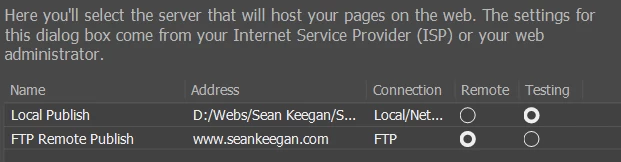


Actual questions:


1) Am I basically on the right track? How about those radio-buttons?


2) I want to publish to the local server until satisfied it works OK and then publish to the web. But there is only one "Put" choice in the site menu - How do I specify whether DW puts to the local or remote server?  


Thanks in advance.


PS - I am having particular trouble putting scrcset images to servers - I will post separately on this.

    This topic has been closed for replies.

    1 reply

    Nancy OShea
    Community Expert
    Community Expert
    June 22, 2021

    PUT = UP arrow = upload to remote server.

    GET = DOWN arrow = download from remote server to local site.


    See my screenshots below for defining your local site within your local testing server on your primary drive.  My primary drive is C:\ not D:\


    Define Remote Server:


    Nancy O'Shea— Product User & Community Expert
    Nancy OShea
    Community Expert
    Community Expert
    June 22, 2021

    With the above set-up, saving files automatically places them in your local testing server.  There is nothing to upload until you're ready to deploy files on the live site.


    Nancy O'Shea— Product User & Community Expert
    Galeodan
    GaleodanAuthor
    Known Participant
    June 22, 2021

    Thanks Nancy. I already had the servers setup as you illustrate. And I know how to set Auto-push. The missing piece was how to determine whether I am  putting to the local or remote server. But I think I see the answer now - In the Files panel to which you directed my attention.


    In addition to the Up (Put) and down (Get) arrows, I see there is an icon to connect \ disconnect from the remote server. Once the connection is made, clicking Up-arrow will send the files to the remote server (I assume they also go to the local server at the same time.) While disconnected, only the local server is fed. I have read all sorts of guides but this last step seems to be some kind of secret. 🙂